Most beginners open Google Ads, stare at the setup screen, and pick whatever Google suggests. Then they burn through a week’s budget on clicks that never turn into a lead. That’s not a Google Ads problem. It’s a setup problem, and it’s fixable before you spend a single dollar.
This guide walks through how to setup your first Google Ads campaign the right way: account creation, campaign type, keywords, ad copy, budget, and conversion tracking, in the order that actually matters. If you’re still weighing pay-per-click advertising against your other channel options, that’s worth settling first. But if Google Ads is your pick, by the end of this guide you’ll have a campaign built to report on its own performance instead of one you’re guessing about.
Table of Contents
What Is Google Ads and How Does It Work?
Google Ads is Google’s pay-per-click advertising platform. Businesses bid on keywords, write ads, and pay only when someone clicks. Every time a person searches a term you’re targeting, Google runs a real-time auction that weighs your bid against your ad’s quality to decide if, and where, your ad appears.
That auction runs on two main inputs: your bid and your Quality Score. Quality Score is Google’s own 1-10 rating of how relevant your ad and landing page are for a given keyword, built from expected click-through rate, ad relevance, and landing page experience. A higher score doesn’t just look good. It can lower your cost per click and improve where your ad shows, because Google rewards ads that actually match what the searcher wants.
This is where Google Ads splits from SEO. Organic rankings take months to build and don’t stop working when you pause your effort. Paid search shows up the moment your campaign goes live and stops the moment your budget runs out. Neither one replaces the other. Most businesses eventually run both, since paid search covers the gap while organic content builds toward long-term traffic. Our guide on paid search vs. organic search breaks down when to lean on each one.
Every campaign is also built from a few nested pieces worth knowing before you open the sign-up page: a campaign holds one or more ad groups, each ad group holds a small set of related keywords and the ads written for them, and every keyword carries a match type that controls how loosely or tightly it triggers your ad. Get comfortable with that structure now, and the setup steps below will make a lot more sense as you move through them.
Before You Touch the Sign-Up Page: 4 Things to Prepare
An account takes ten minutes to setup. A good setup takes a bit more prep, and that prep is what separates a campaign that reports useful data from one that just burns through a budget. Handle these four things first, and the rest of the process moves fast.
Pick one goal. Leads, sales, or phone calls. Not all three. A campaign built around one clear outcome is easier to measure and easier to optimize than one trying to do everything at once.
Know your numbers. You don’t need a perfect budget, but you need a starting one. Decide what you’re willing to spend per day and roughly what a new customer is worth to you. That second number tells you how much you can afford to pay per click without losing money.
Get a landing page ready. Not your homepage. A page built around the exact offer in your ad, with one clear next step. A mismatched ad and landing page is one of the fastest ways to waste a Quality Score and a budget at the same time.
Draft a short keyword list. Ten to twenty terms your ideal customer would actually type into Google when they’re ready to buy or inquire, not just terms that describe your business in general.
Step 1: Create Your Google Ads Account
Visit ads.google.com and sign in with a Google account. During setup, Google defaults new accounts into Smart Mode, its automated, lighter-touch option. Click through to Expert Mode instead.
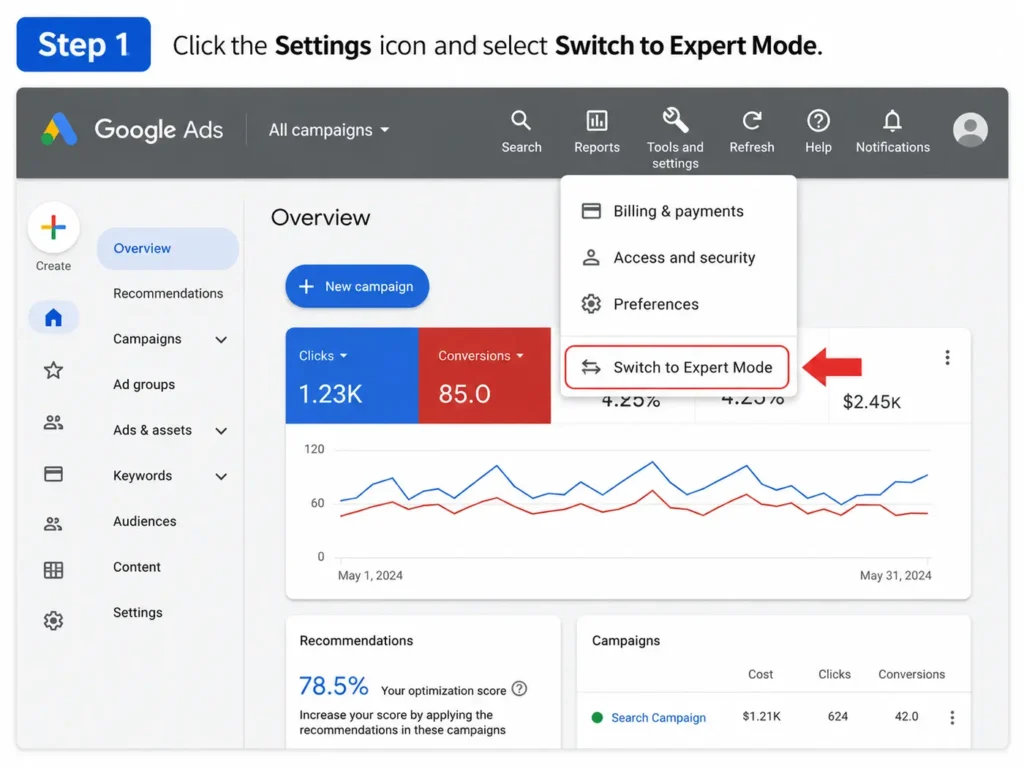
Smart Mode trades control for convenience: fewer settings, less visibility into what’s actually happening in your account. Expert Mode takes a few extra minutes to setup but gives you full access to targeting, bidding, and negative keywords from day one, which matters far more once real money is on the line.
Add your business name and website URL, and link your Google Business Profile if you have one. This helps Google pull accurate business details into your account and speeds up later steps.
Step 2: Choose Your Campaign Goal and Campaign Type
Google will ask for your campaign objective: Sales, Leads, Website Traffic, Brand Awareness, or a few others. Pick whichever matches the single goal you set earlier. This choice shapes the bidding and targeting options Google offers you next.
Then choose a campaign type. Google Ads runs several: Search, Display, Video, Shopping, Performance Max, and Demand Gen. For a first campaign, Search is almost always the right call.
Search campaigns show text ads to people actively typing a relevant query into Google. That’s high-intent traffic, people already looking for what you offer, which makes Search the easiest campaign type to measure and the fastest to learn from. Save Display, Video, and Performance Max for once you understand what a working campaign looks like in your account.
Step 3: Build Your First Ad Group and Keyword List
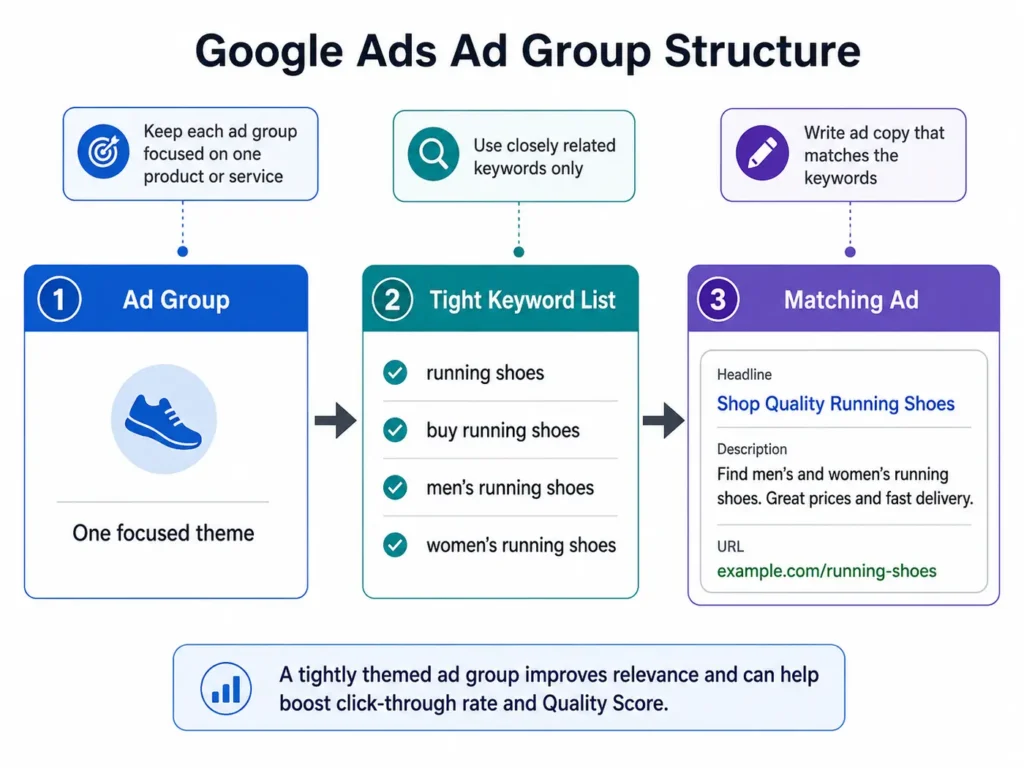
An ad group is a bundle of closely related keywords that share the same ads. Keep your first ad group tight. Say you sell running shoes. Don’t mix “running shoes” and “hiking boots” in the same group. Split them into separate ad groups, because a shared ad rarely serves two different search intents well, and Google notices the mismatch too.
Add your keyword list using match types, which control how closely a search has to match your keyword before your ad can show:
- Broad match shows your ad for searches related to your keyword’s meaning, even without matching words. Widest reach, least control.
- Phrase match shows your ad when the search includes your keyword’s meaning in the same word order. A useful middle ground for beginners.
- Exact match shows your ad only for searches that closely match your exact keyword. Narrowest reach, tightest control, and often the safest starting point for a limited budget.
Build your negative keyword list at the same time, not later. Negative keywords tell Google which searches to exclude, like “jobs,” “free,” or “DIY” if you sell a paid service. Skip this step and you’ll burn budget fast on clicks that were never going to convert, and you won’t know why until the invoice arrives.
Step 4: Write Ads People Actually Click
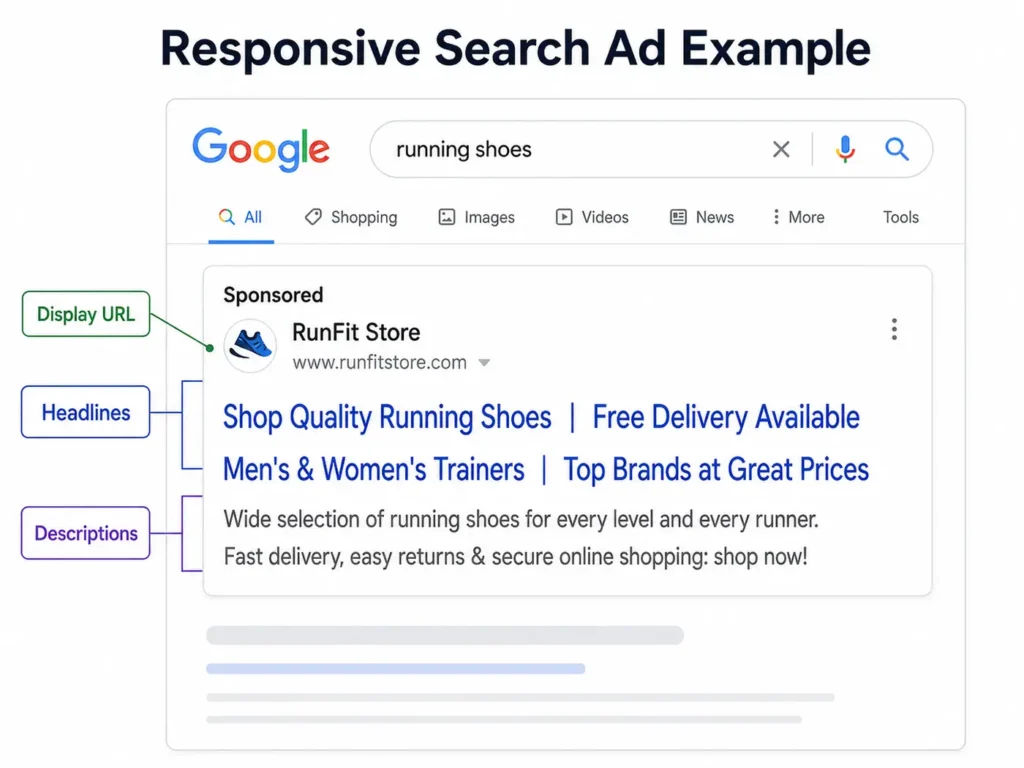
Google’s responsive search ads ask for up to 15 headlines and 4 descriptions, then test combinations to find what performs best. You don’t need all 15 on day one, but aim for at least 8-10 headlines and 3-4 descriptions so Google has real variety to test.
A few rules that consistently work:
- Put your primary keyword in at least one headline. It signals relevance to both Google and the searcher.
- Lead with the outcome, not the feature. “Get a Free Quote in 24 Hours” beats “We Offer Quotes.”
- Include a specific, low-friction call to action: “Book Now,” “Get Your Free Estimate,” “Start Your Trial.”
- Add ad assets (formerly called extensions): sitelinks, callouts, and a call button if phone leads matter to your business. These take up more space on the results page and give searchers extra reasons to click.
Every ad needs a final URL pointing to the landing page you prepared earlier, not your homepage. Write two or three ad variations per group rather than just one. Google’s own testing will surface which combination of headlines and descriptions actually earns clicks, and that data becomes your starting point for round two.
Step 5: Set Your Budget and Bidding Strategy
Set a daily budget you’re comfortable spending even if a day underperforms. There’s no universal right number, but most beginners do well starting somewhere between $15 and $30 a day and adjusting after two to three weeks of real data.
Here’s the math worth doing before you launch: divide your daily budget by your estimated cost per click for your industry to get a rough sense of daily clicks.
| Daily Budget | Estimated CPC | Approx. Daily Clicks |
|---|---|---|
| $20 | $4 | 5 |
| $30 | $5 | 6 |
| $50 | $6 | 8 |
If that click volume feels too low to learn anything meaningful within a month, either raise the budget or narrow your keyword list to fewer, higher-intent terms so each click has a better shot at converting.
For bidding strategy, most beginners start with Maximize Clicks to build initial data, then switch to Maximize Conversions or Target CPA once conversion tracking has enough data to guide Google’s automated bidding. Manual bidding gives more control but demands more hands-on management than most first-time advertisers have time for.
Step 6: Setup Conversion Tracking Before You Launch
This is the step most beginner guides tuck in at the very end, almost as an afterthought. Set it up before your campaign goes live, not after.
Conversion tracking tells Google Ads what counts as a win: a form submission, a phone call, a purchase. Without it, you’re paying for clicks with no way to tell which ones turned into anything, and Google’s automated bidding has no signal to optimize toward.
Link your Google Ads account to Google Analytics 4, then setup conversion actions for your primary goal, whether that’s a form fill, a call, or a completed purchase. If your landing page and tracking aren’t ready, delay launch by a day rather than fly blind through your first week of spend.
What a Good First Campaign Looks Like
Every industry performs differently, so treat any benchmark as a compass, not a target. Still, having a rough sense of “normal” saves beginners from panicking over numbers that are actually fine.
WordStream’s 2026 US benchmark data puts average search ad performance across all industries at a 6.64% click-through rate, a $5.42 cost per click, an 8.18% conversion rate, and a $66.69 cost per lead. On cost specifically, legal services and home improvement run highest ($9.87 and $8.33 per click), while arts and entertainment runs lowest ($1.63 per click). That said, arts and entertainment also posts the highest click-through rate of any category, so a low CPC doesn’t automatically mean a weak-performing niche.
If your first two weeks land in the same neighborhood as these numbers, your setup is working. If your CTR sits far below average, your ad copy or keyword match is probably too loose. If your conversion rate is far below average, the problem usually sits on the landing page, not the ad.
5 Mistakes That Waste a Beginner’s Budget
Sending traffic to the homepage. A general homepage rarely matches the specific promise in your ad, which drags down both conversion rate and Quality Score.
Skipping negative keywords. Without them, your ads show for searches that were never a fit, and that spend adds up fast.
Mixing unrelated keywords in one ad group. It forces one ad to serve multiple search intents, which serves none of them well.
Turning on every campaign type at once. Search, Display, and Performance Max all behave differently. Learn one before adding the next.
Judging results after two days. Google’s auction and bidding systems need real data to find their footing. Give a new campaign at least one to two weeks before making major changes.
FAQ
How much should a beginner spend on their first Google Ads campaign?
Most beginners start comfortably between $15 and $30 a day, adjusting after two to three weeks of real performance data. The right number depends more on your industry’s typical cost per click and how many conversions you need to judge performance than on any fixed rule.
Is Google Ads good for small businesses?
Yes, particularly because it lets you cap spending at whatever daily amount you’re comfortable with and pause at any time. The tradeoff is that it takes ongoing attention. A small business running Google Ads without regular monitoring tends to waste budget faster than one running it with a clear weekly check-in.
How long does it take to see results from Google Ads?
Impressions and clicks start immediately after launch, often within hours. Meaningful conversion data usually takes one to two weeks to build up, since Google’s bidding systems need real activity before they can optimize effectively.
What’s the difference between Google Ads and SEO?
Google Ads is paid placement that stops the moment you stop paying. SEO is unpaid, or organic, ranking that takes longer to build but keeps working without ongoing spend. Most established businesses run both, using paid search for speed and SEO for long-term traffic.
Do I need a separate landing page for Google Ads?
Yes, in almost every case. A landing page built around the exact offer in your ad converts better than a general homepage, and it directly improves your Quality Score, which can lower your cost per click.