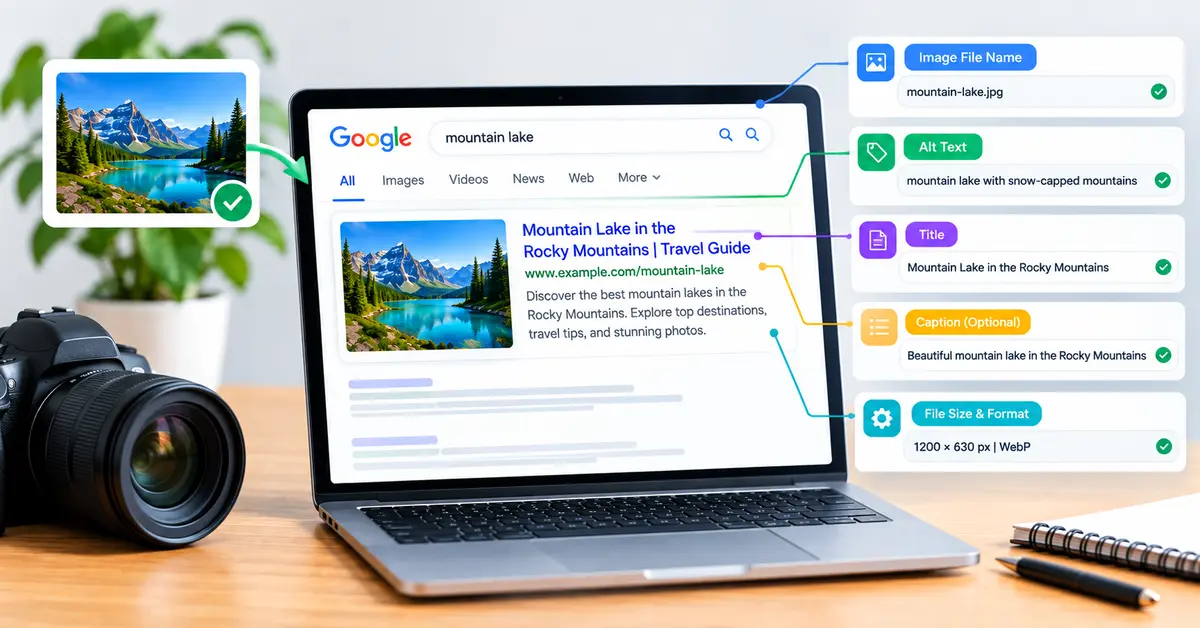
Images are usually the heaviest thing on a web page and the least optimized. Most small-business sites we audit are carrying photos straight off a phone or a stock library, three times larger than they need to be, named IMG_4471.jpg, with no alt text at all.
That’s one of the fastest technical wins on the table. It improves rankings, page speed and accessibility all at once. Here’s how to do it properly.
What Is Image SEO?
Image SEO is the practice of optimizing the images on your website so search engines can understand them and pages load quickly. It covers descriptive file names, alt text, modern formats like WebP, compression, and correct sizing. Done well, it improves rankings, accessibility and page speed.
Two things are happening at once. You’re helping Google work out what each image shows, which can win you traffic from Google Images. And you’re cutting file sizes, which speeds up the page for everyone.
Image SEO is one piece of a bigger picture. If you haven’t worked through the fundamentals yet, our on-page SEO guide covers the rest.
How Do You Write Good Alt Text?
Alt text is the written description of an image, read aloud by screen readers and used by search engines to understand the picture.
Good alt text describes what the image shows in plain language, usually in five to fifteen words. Write it for someone who cannot see the picture. Include a keyword only where it fits naturally, and use empty alt text for decorative images so screen readers skip them entirely.
A few examples make the difference obvious.
| Image | Weak alt text | Strong alt text |
|---|---|---|
| Photo of a plumber fixing a tap | plumber | Plumber repairing a leaking kitchen tap under a sink |
| Chart of monthly traffic | chart | Line chart showing organic traffic rising from 400 to 1,200 visits over six months |
| Decorative background swirl | swirl graphic background design | “ (empty, so screen readers skip it) |
Skip phrases like “image of” or “picture of.” Screen readers already announce that it’s an image. And resist stuffing keywords in. Google treats keyword-stuffed alt attributes as a spam signal, and it makes the page worse for the people alt text exists to help.
Do Image File Names Matter for SEO?
Yes, and they’re the step most people skip.
Google’s own documentation says file names give it very light clues about the subject of an image, and recommends short, descriptive names over camera defaults. Light clues still beat none. black-kitten-sleeping.jpg tells Google something. IMG00023.JPG tells it nothing.
Three rules cover it:
- Describe the image in a few words.
cafe-fitout-before.jpgbeatsphoto1.jpg. - Use hyphens between words. Search engines read hyphens as word separators. Underscores and spaces don’t work the same way.
- Keep it lowercase and short. Avoid long strings of keywords. Three or four words is plenty.
Rename files before you upload them. A file name change after the page is live means the URL changes too, which breaks the link and can lose any ranking the image earned.
Which Image Format Should You Use?
Format choice drives most of your file-size savings. WebP is the sensible default for photos and graphics on a modern website.
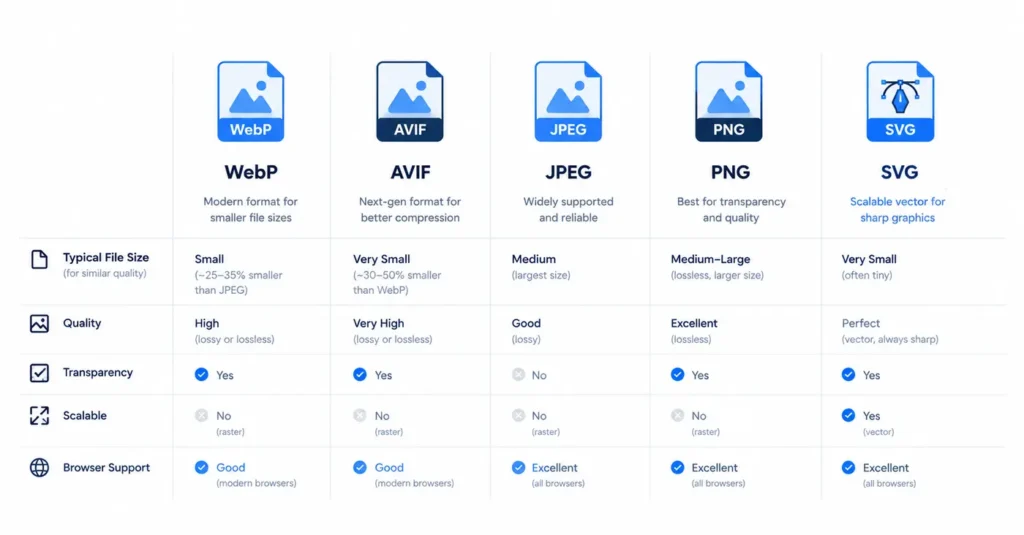
Google’s own WebP documentation puts lossy WebP files at roughly 25% to 34% smaller than comparable JPEG files at the same quality. That’s a meaningful cut to page weight for a change that takes minutes.
| Format | Best for | Notes |
|---|---|---|
| WebP | Almost everything: photos, graphics, images needing transparency | 25% to 34% smaller than JPEG (Google). Supported by every current browser. The default choice. |
| AVIF | Photos where you want the smallest possible file | Compresses better than WebP again, but encoding is slower and support is slightly newer. |
| JPEG | Fallback for photos on older systems | Still fine, just larger than WebP for the same quality. |
| PNG | Screenshots, images needing sharp edges or transparency | Large files. Use WebP instead where you can. |
| SVG | Logos, icons, simple line graphics | Scales to any size with no quality loss and tiny file sizes. Not for photos. |
Most WordPress sites can convert to WebP automatically with an image plugin, so you rarely need to do it by hand.
How Do Images Affect Page Speed and Rankings?
This is the part most image SEO guides leave out, and it matters more than alt text.
Google states plainly that images are often the largest contributor to a page’s total size. That makes them a main driver of your Largest Contentful Paint, one of Google’s Core Web Vitals. A hero image that takes four seconds to appear drags down the score for the whole page. Page experience signals feed into rankings, and slow pages lose visitors regardless of where they rank.
Four habits fix most of it:
- Compress every image before upload. Tools like Squoosh or TinyPNG cut file size heavily with no visible quality loss.
- Size images to the space they fill. Uploading a 4000px photo into an 800px slot wastes bandwidth on every visit. Resize first.
- Lazy-load images below the fold so the browser only fetches them when the visitor scrolls near. Most modern themes do this already.
- Set explicit width and height on every image. This stops the page jumping around as images load, which protects your Cumulative Layout Shift score.
![Before and after screenshot showing a client product image reduced from [actual file size] to [actual file size] after WebP conversion](https://www.rankiwis.com/wp-content/uploads/2026/09/image-compression-before-after-1024x933.webp)
In the audits we run, oversized uncompressed images are the single most common speed problem we find. It’s also the cheapest to fix.
Not sure what’s slowing your site down? A quick technical check will tell you in under an hour. Get in touch with Rankiwis for a free look.
How Do You Get Images to Show in Google Images?
Google Images can send real traffic, especially for product, recipe and how-to searches. A few extra steps help.
Give every image surrounding context. Google reads the text near an image to understand it, so place images next to the copy they illustrate rather than dumping them in a gallery. Use proper <img> tags rather than CSS background images, because Google can’t index a background image as page content. Add images to your XML sitemap so they get discovered. And for products, recipes and how-to content, add the matching structured data so your images qualify for rich results.
Titles, header tags and images working together are what move pages. See our guides to title tag optimization and header tags for the rest of the on-page picture.
Frequently Asked Questions
What is alt text and why does it matter? Alt text is a short written description of an image. Screen readers read it aloud for people who cannot see the picture, and search engines use it to understand what the image shows. It supports both accessibility and image search visibility.
How long should alt text be?
Around five to fifteen words is the practical range. Long enough to describe the image clearly, short enough to be useful when read aloud. Leave it empty for decorative images so screen readers skip past them.
Is WebP better than JPEG?
For most websites, yes. Google’s own documentation puts WebP files at roughly 25% to 34% smaller than JPEG at similar quality, and every current browser supports it. Smaller files mean faster pages, which helps both visitors and rankings.
Should I put keywords in image file names?
Use a keyword only where it describes the image accurately. office-fitout-reception.jpg is fine. Stuffing several keywords into one file name adds no benefit and looks spammy. Describe the picture first.
Do images affect page speed and rankings?
Yes. Images are usually the heaviest files on a page and directly affect Largest Contentful Paint, one of Google’s Core Web Vitals. Compressing and correctly sizing images is one of the quickest ways to improve page speed.
What size should images be on a website?
Match the image to the space it fills on screen. A full-width hero might need 1,600 to 1,920 pixels wide, while a blog body image rarely needs more than 800 to 1,200. Resize before uploading rather than letting the browser shrink a huge file.
Want a second set of eyes on your site’s technical basics? Rankiwis helps businesses fix the fundamentals that hold good sites back. Visit rankiwis.com to get started.