Google rewrote 76% of title tags in the first quarter of 2025. Not tweaked. Rewrote.
That number comes from a study run by SEO consultant John McAlpin and published on Search Engine Land, and it’s a jump from 61% just two years earlier. I’ve pulled that stat up in more than one client call, and it lands every time, because most people assume they have full control over how their page shows up in Google. They don’t. So before you spend another hour polishing a headline, it’s worth asking: does title tag optimization even matter if Google might scrap your version anyway?
Yes, and here’s why. A weak title gets rewritten into something generic. A strong one gives Google far less reason to touch it, and it does the real job a title tag has always had: earning the click. I’ve seen the same handful of fixes move the needle on client accounts over and over, so this guide walks through what a title tag actually does, how long it should be, a formula you can apply to any page, five formulas you can steal right now, and a repeatable process for auditing the ones that are already underperforming.
Table of Contents
What Is a Title Tag?
A title tag is a line of HTML code in the <head> section of a webpage. It defines the title that shows up as the clickable blue link in search results, as the text on a browser tab, and as the headline when someone shares your page on social media. It’s not visible on the page itself. Readers only see it in these external spots.
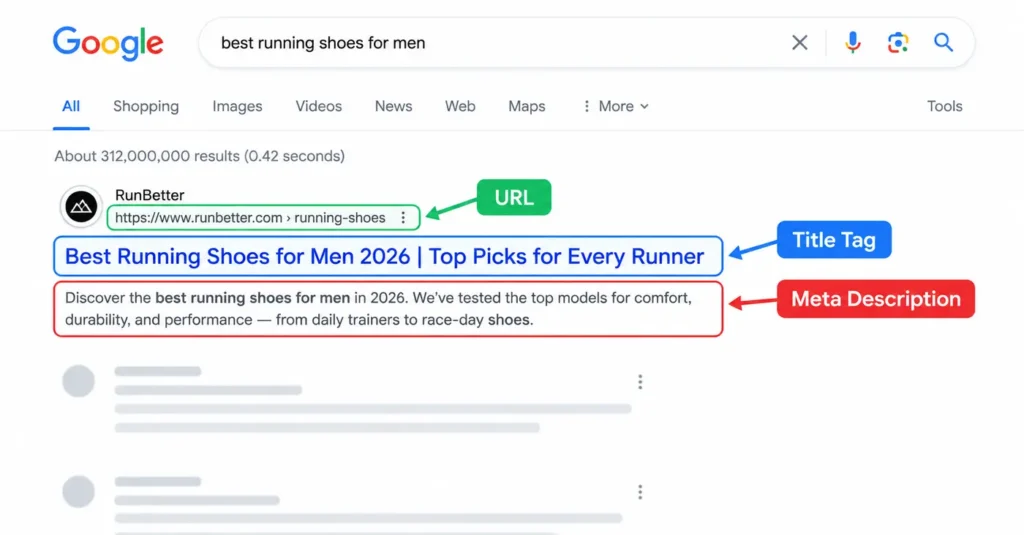
A title tag is the HTML element that defines the clickable headline shown in search results, browser tabs, and social previews. It tells both search engines and readers what a page is about, and it plays a direct role in rankings, click-through rate, and how AI search tools decide what to cite.
In code, it looks like this:
<title>Title Tag Optimization: How to Write Titles That Rank</title>Most content management systems, including WordPress, give you a dedicated field for this. Yoast, Rank Math, and similar plugins pull whatever you enter there and drop it into the title tag automatically. Miss that field, and the CMS often defaults to the post title or page name, which rarely does the job as well as a title written specifically for search. I still catch this on client sites more often than I’d expect, usually on pages nobody’s touched since the site launched.
Why Title Tags Matter More Than Ever
Search used to work one way: rank high, get the click. That still matters, but the click itself has gotten harder to earn.
A Pew Research Center analysis of 900 U.S. adults’ browsing data found that when a Google search produced an AI Overview, users clicked a traditional result link in just 8% of visits. Without an AI Overview, that number was 15%, nearly double. People are seeing more answers directly on the results page, and fewer of them are clicking through at all.
That shift raises the stakes for the one line of text competing for attention. Your title tag now has to work harder in two directions: convince a human to click past an AI summary, and give an AI engine a clear, trustworthy signal about what your page covers if it wants to cite you instead.
Add the rewrite problem on top of that. Google’s own documentation on title links confirms it pulls from your <title> element, your main visual heading, your H1, your og:title tag, and even anchor text from other sites linking to you, then decides which combination best serves the searcher. A clear, accurate, well-structured title tag is simply more likely to survive that process untouched.
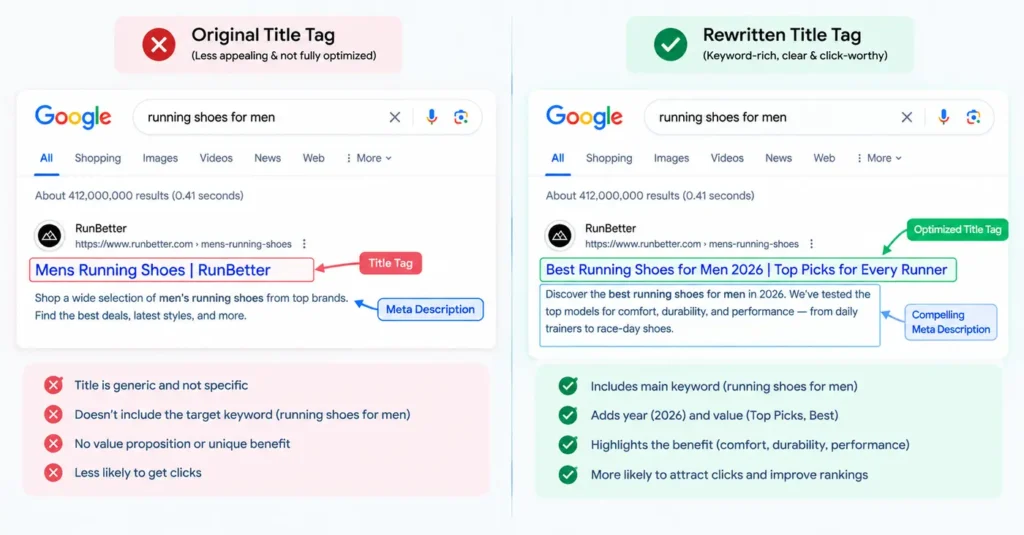
I’ll be honest, the first time I saw Google swap out a client’s carefully written title for something flatter and more generic, it stung a little. Years in, I’ve made my peace with it. Google’s version is usually trying to solve for clarity, not spite, and once you accept that, the job shifts from “control every character” to “give Google the least reason to intervene.”
Title Tags for AI Search: What Actually Changes
Most title tag advice still treats Google as the only audience. That gap is worth closing, because ChatGPT with search, Perplexity, and Google’s own AI Overviews all display source titles next to the answers they generate, and a compelling title is often the only thing standing between a reader and a click.
The mechanics don’t change much. AI engines still favor titles that are clear, specific, and free of keyword stuffing, the same qualities that help a page rank in traditional search. What changes is the stakes. When a page ranks at position four in Google but gets pulled into an AI Overview because it’s the clearest, most directly answerable source on the topic, the title tag becomes the deciding factor in whether that visibility turns into an actual visit.
Two practices carry extra weight here. First, match your title to the exact question format a searcher would type into an AI chat interface, since AI engines increasingly parse queries as full questions rather than short keyword strings. Second, keep the H1 and the first sentence of your content aligned with the title’s promise, since AI engines cross-reference all three when deciding whether a page deserves a citation. Our guide to writing quotable answer blocks covers the content-side half of this strategy in more detail.
How Long Should a Title Tag Be?
Character counts get thrown around a lot, but Google doesn’t actually cut off titles based on character count. It cuts them off based on pixel width, somewhere around 580 to 600 pixels on desktop.
Aim for 50 to 60 characters as a practical target. That range fits inside the pixel limit for most letter combinations without leaving unused space. Wide letters like “W” and “M” eat up more pixels than narrow ones like “i” and “l,” so two titles with identical character counts can display differently.
Google truncates titles based on pixel width, not character count, which is why the widely used 50-to-60-character range exists. Titles inside that range rarely get cut off with an ellipsis on desktop, and staying closer to 55 characters gives you a safety margin on mobile, where the display area is narrower.
Run any draft through a free SERP preview tool before you publish. It shows you exactly where Google is likely to truncate, on both desktop and mobile, so you’re not guessing. I keep one bookmarked and paste in every title before it goes live, out of habit more than anything at this point.
The Title Tag Formula That Actually Works
Strip away the jargon and a good title tag does three things: it leads with what the page is about, tells the reader what they’ll get, and saves the brand name for last. Here’s how to apply each part.
Lead with the keyword
Put your primary keyword, or a close variation of it, as early in the title as you can. Readers scan left to right, so the first few words carry the most weight for both attention and relevance. Listicles are the exception: lead with the number instead, since “7 Title Tag Mistakes” reads better than “Title Tag Mistakes: 7 to Avoid.”
Say what the reader gets
A keyword alone won’t earn a click. Pair it with a clear benefit, a format signal, or a specific detail that separates your page from the ten other results saying roughly the same thing. “Title Tag Length: The 2026 Character and Pixel Guide” tells a reader exactly what they’re getting before they click.
Save the brand name for the end
For most informational content, your brand name adds little value up front and eats up characters you need for the keyword and benefit. Push it to the end, after a pipe or dash, where it still builds recognition without crowding out what matters. Well-known brands can lead with their name on branded searches. New or smaller brands almost always do better leading with the topic. I push back on this with newer clients more than any other title tag question I get. Everyone wants their brand name up front. Almost nobody’s audience is searching for that brand name yet.
5 Title Tag Formulas You Can Steal Today
Staring at a blank title field is its own kind of writer’s block. I keep a version of this list saved in a doc I reuse with nearly every client, and these five formulas work across most industries and search intents.
- The Direct Answer: [Keyword]: [What It Is/Does]. Example: “GA4 Attribution: How Google Tracks Your Conversions“
- The Numbered List: [Number] [Adjective] [Topic] for [Audience]. Example: “9 Email Segmentation Tactics for Ecommerce Brands”
- The How-To Promise: How to [Achieve Outcome] in [Timeframe/Method]. Example: “How to Lower Your Google Ads CPA Without Cutting Budget”
- The Comparison: [Option A] vs. [Option B]: Which One [Does What]? Example: “Meta Ads vs. Google Ads: Which One Converts Better for SaaS?”
- The Complete Guide: [Topic]: The Complete Guide for [Year/Audience]. Example: “Local SEO: The Complete Guide for Multi-Location Businesses”
Swap in your own keyword and audience, and each formula gives you a starting point that’s already clear, specific, and built around search intent instead of guesswork.
Test more than one formula on your highest-traffic pages. A comparison title might win for a bottom-funnel page where a reader is choosing between two tools, while a how-to promise wins for a top-funnel blog post where the reader wants a process. Pull up your Google Search Console data before you decide, since the pages already ranking on page one for a given query tell you which format Google currently rewards for that specific search.
How to Audit and Fix Underperforming Title Tags
Writing new titles is only half the job. Most sites are sitting on pages with title tags that were fine a year ago and have quietly stopped pulling their weight. I run this exact process on client accounts every quarter, and it almost always turns up a handful of pages nobody would have flagged otherwise. Here’s the process.
- Open Google Search Console and go to Performance, then the Pages tab. This is where impressions, clicks, and average position all live in one place.
- Sort by impressions, then scan for pages with high impressions and a low click-through rate relative to their position. A page ranking in position 4 or 5 with a CTR under 2% is a title tag problem before it’s anything else.
- Check the current title against search intent. Pull up the top five results for the target keyword and compare formats. If every competitor uses a how-to format and your title reads like a product description, that mismatch is likely costing you clicks.
- Rewrite using the formula above: keyword early, clear benefit, brand at the end. Keep it inside the 50-to-60-character range.
- Request indexing for the updated page inside GSC’s URL Inspection tool, then track CTR for that page over the next two to three weeks.
- Compare the before-and-after CTR. If it climbs and rankings hold steady or improve, the new title is working. If rankings drop, the new title may be misaligned with what’s actually on the page, which is its own signal worth investigating.
The pages that respond fastest are almost always the ones sitting in position 3 through 7 with a title that reads like it was written for a different purpose entirely, an old product name, a leftover placeholder, something written before the page’s content shifted. Those are the easiest wins on the list.
Our full guide to Google Search Console walks through setup and every report mentioned here in more depth if you need the fundamentals first.
Title Tag Mistakes That Quietly Cost You Rankings
A handful of errors show up on page after page, and most are simple to catch once you know where to look. I still see the first one on audits more than I’d like to admit, even from teams who know better.
- Keyword stuffing. “SEO Services SEO Company Affordable SEO Agency” reads as spam to both Google and humans, and it’s one of the fastest ways to trigger a rewrite. I’ve inherited more than one client site with titles like this, usually written years earlier under different advice, and cleaning them up is often the single fastest win in an entire audit.
- Duplicate titles across pages. Every page needs its own title. The same one repeated across product pages, location pages, or blog categories confuses search engines about which page to rank for a given query.
- A search intent mismatch. A commercial, sales-driven title on an informational blog post will underperform even if it’s technically well written, because it doesn’t match what the searcher expects to find.
- Mobile truncation, overlooked. Mobile search results show fewer characters than desktop. Front-load your most important words so the title still makes sense if it gets cut short.
- A blank title field. No title tag means Google fills the gap on its own, usually by pulling from the H1 or page content, and that version rarely reflects the strategy you’d choose yourself.
Title Tag vs. H1 vs. Meta Description
These three elements get confused constantly, but they each do a different job.
| Element | Where It Appears | Who It’s For |
|---|---|---|
| Title tag | Search results, browser tabs, social shares | Search engines and click decisions |
| H1 | Top of the page itself | Readers already on the page |
| Meta description | Below the title in search results | Readers deciding whether to click |
Your title tag and H1 should cover the same topic without being identical. Give the title tag the job of earning the click, and let the H1 read more naturally for someone who’s already there. Our on-page SEO guide covers how title tags, H1s, and the rest of your on-page elements work together as a full checklist.
A Few Closing Thoughts
None of this is complicated once you’ve done it a few times. The part people underestimate isn’t the writing, it’s the maintenance. Titles that worked well when a page launched can quietly stop working a year later, once competitors shift their formatting or Google decides your old version no longer matches what searchers expect. I check mine on a schedule for exactly that reason, and it’s rarely a wasted hour.
Title Tag FAQs
Do my title tag and H1 need to match exactly?
No, and they usually shouldn’t. Both need to reflect the same topic, but writing them differently lets you target additional keyword variations and gives each element the right tone for its audience: search engines and skimmers for the title, engaged readers for the H1.
Why does Google keep rewriting my title tags?
Google rewrites titles it judges as too long, too vague, keyword-stuffed, or a poor match for what the searcher typed. A clear, accurate, appropriately sized title gives Google less reason to intervene, though there’s no guarantee it will always be left untouched.
What’s the ideal title tag length in 2026?
Stay between 50 and 60 characters as a practical target, since that range generally fits inside Google’s roughly 580-to-600-pixel display limit without truncating. Use a SERP preview tool to confirm before publishing, since wide letters can push a shorter title past the limit.
Do title tags still matter for AI search tools like ChatGPT and Perplexity?
Yes. AI search tools display source titles alongside their answers the same way Google shows them in traditional results, so a clear, specific title still helps convince a reader to click through instead of stopping at the summary.