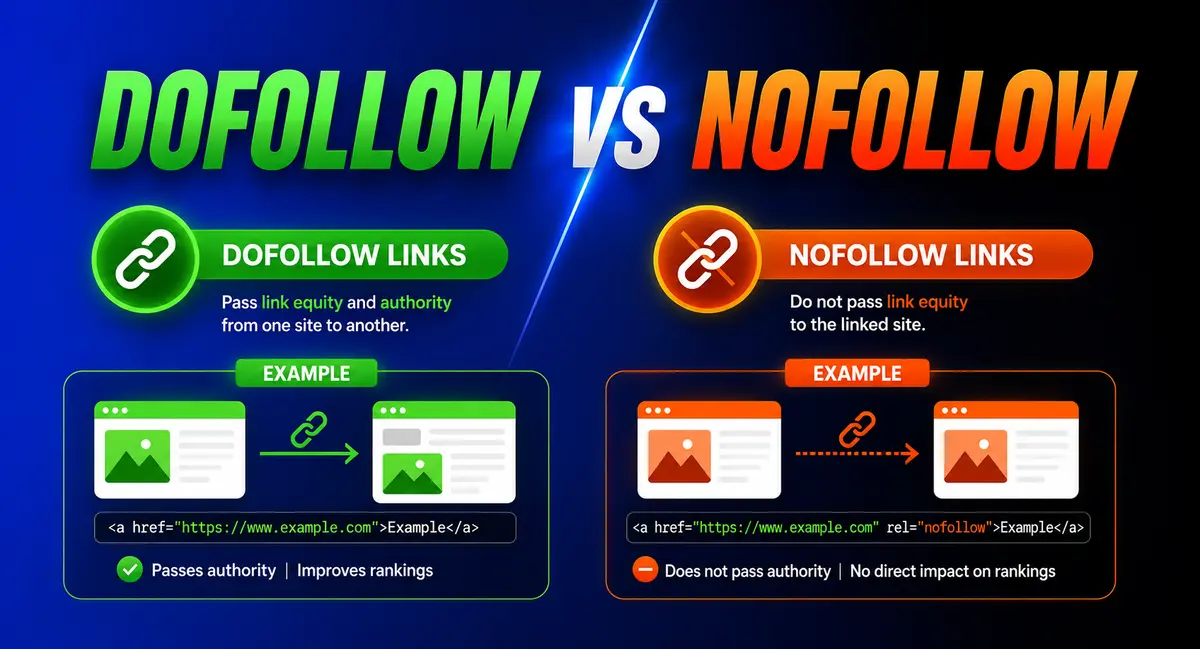
Every backlink your site earns falls into one of two buckets: dofollow or nofollow. Get the two confused, and you’ll misjudge which links are actually building your authority and which ones are just sending traffic your way.
A dofollow link passes ranking credit from the linking page to yours. A nofollow link, by default, doesn’t. That’s the short version of the dofollow vs. nofollow links question, but the full picture changed back in 2019, when Google split “nofollow” into three separate signals and quietly turned the whole system into something closer to a suggestion than a rule.
This guide covers what each attribute does today, when to use dofollow, nofollow, sponsored, or UGC tags, how to check any link’s status, and how to add these attributes in WordPress.
What Is a Dofollow Link?
A dofollow link is the default state of every hyperlink on the web. No one needs to add any code to make a link dofollow. A link only becomes something else, nofollow, sponsored, or UGC, when someone deliberately marks it that way.
When one site links to another with a plain, unmarked link, Google’s crawlers can follow it to discover the destination page and treat the link as a vote of confidence. That vote contributes to link equity, the ranking value a page can pass to whatever it links to.
A dofollow link is any hyperlink without a rel attribute telling search engines to ignore it. Search engines can crawl through it, index the destination page, and count it as a signal of trust and relevance, the mechanism behind what’s commonly called “link equity” or “link juice.”
What Is a Nofollow Link?
Google introduced the nofollow attribute in 2005 to fight comment spam. Before nofollow existed, spammers flooded blog comment sections with links purely to harvest ranking credit. The rel=”nofollow” attribute gave publishers a way to include a link without vouching for it.
A nofollow link still works exactly like any other link for a human visitor. Click it, and the browser takes you to the destination page just the same. The attribute only changes how search engines treat it, and even that changed in 2020.
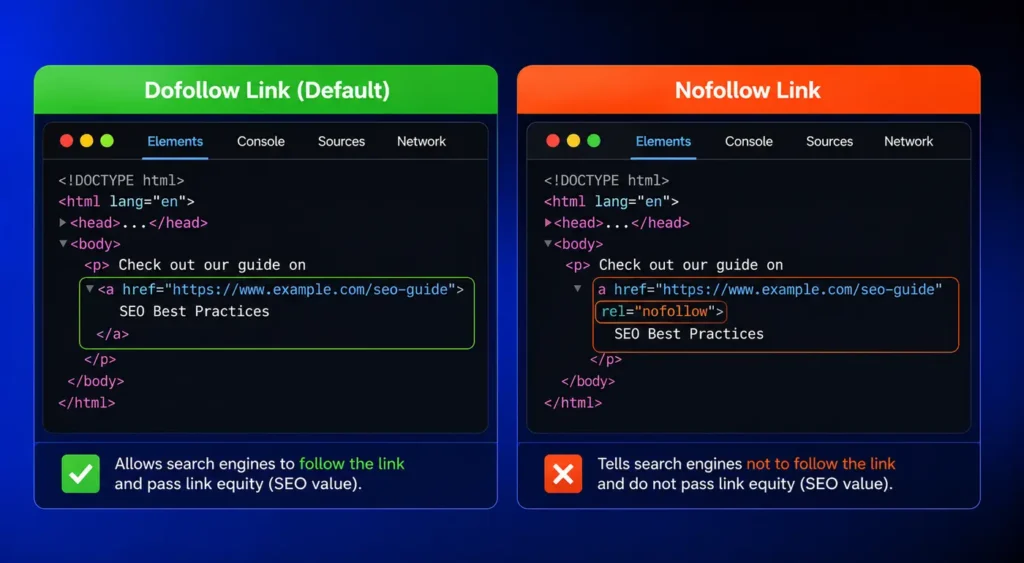
A nofollow link carries a rel=”nofollow” attribute in its HTML code, telling search engines the site owner isn’t vouching for the destination page. Nofollow links still work normally for readers who click them; the attribute only affects how search engines weigh the link for ranking purposes.
What’s the Difference Between Dofollow and Nofollow Links?
The practical difference comes down to trust and ranking signal, not function.
Dofollow links pass ranking signal and link equity to the page they point to. Nofollow links carry a rel attribute that tells search engines not to treat the link as an endorsement. Both link types work identically for site visitors; the difference only affects how search engines weigh the link when calculating rankings.
| Factor | Dofollow | Nofollow |
|---|---|---|
| Default state | Yes, no code needed | No, requires rel=”nofollow” |
| Passes link equity | Yes | Not automatically; Google treats it as a hint |
| Crawled by Google | Reliably | Often, but not guaranteed |
| Typical use | Editorial citations, internal links, trusted sources | Paid links, unverified sources, comments |
| Effect on backlink profile | Builds authority signal | Supports a natural-looking, diversified profile |
The Update Most Guides Still Miss: Sponsored and UGC Links
Most explainers of dofollow vs. nofollow links stop at the two-attribute version of the story, but Google’s rules changed years ago.
On September 10, 2019, Google’s Search Central blog announced two new rel attribute values: sponsored and ugc. Sponsored applies to paid placements, affiliate links, and anything created through a compensation agreement. UGC applies to links inside user-generated content: comments, forum posts, and reviews. Both sit alongside nofollow rather than replacing it, and a link can carry more than one value at once, such as rel=”nofollow sponsored” for backward compatibility with older systems.
Why Nofollow Isn’t a Hard Block Anymore
The bigger shift landed on March 1, 2020. From that date, Google started treating nofollow, sponsored, and ugc as hints rather than directives for crawling and ranking. In practice, Google can still crawl a nofollowed URL, index it, and in some cases use the link as a ranking signal if its systems decide the context calls for it.
That doesn’t mean the attributes stopped mattering. It means they stopped being an absolute wall. A nofollow tag is still the right move for paid placements and untrusted destinations; it just isn’t a guarantee Google will ignore the link completely.
Since March 1, 2020, Google treats nofollow, sponsored, and ugc link attributes as hints, not directives. Google’s systems decide whether to crawl, index, or count a marked link for ranking purposes, using the attribute as one signal among several rather than an absolute block.
When to Use a Dofollow Link
Default to dofollow for links that are genuinely editorial: citations to a source worth trusting, internal links between your own pages, and outbound links with descriptive anchor text to sites worth vouching for. Internal links belong on this list too. There’s no reason to withhold link equity from your own pages.
The old habit of nofollowing internal links to “sculpt” PageRank toward priority pages stopped working after Google changed how it handles internal nofollow links back in June 2009. Matt Cutts, then head of Google’s webspam team, confirmed at SMX Advanced that a nofollowed link still counts toward the total number of outbound links on a page. The ranking value it would have passed simply disappears rather than getting redistributed to the remaining links. Route authority through genuine navigation and contextual linking instead.
When to Use Nofollow, Sponsored, or UGC
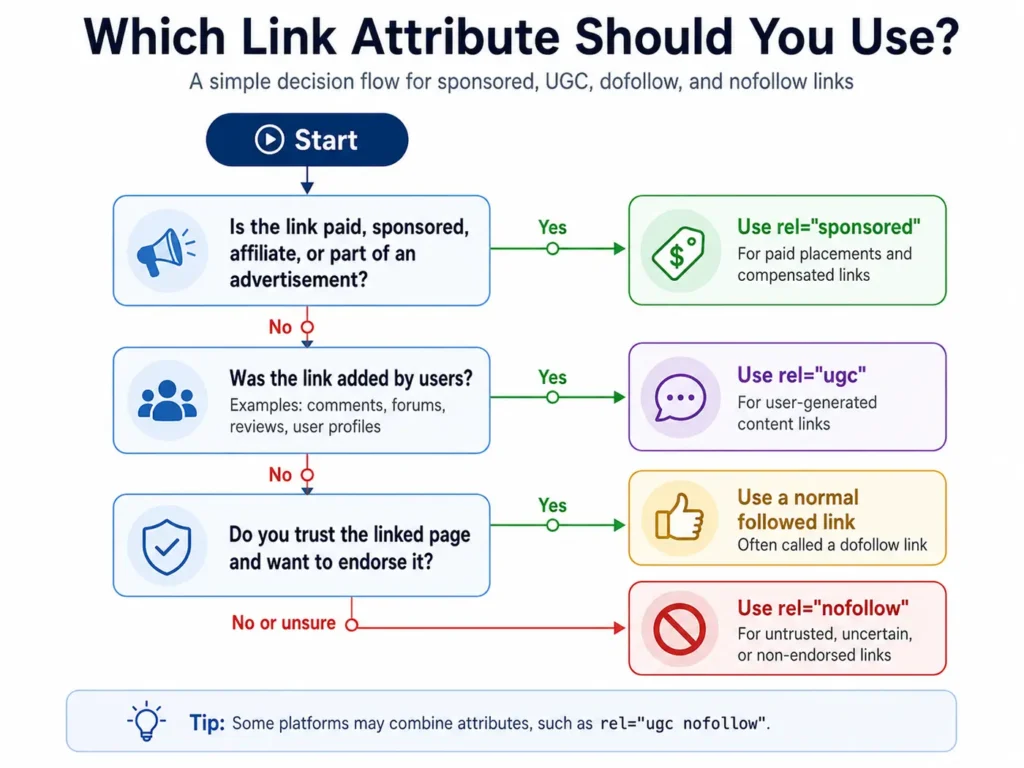
Each attribute has a specific job:
- Sponsored: paid guest posts, affiliate links, sponsored content, and product placements. Google recommends this tag for anything compensated, though plain nofollow still works as a fallback.
- UGC: comments, forum threads, and review sections. This tells Google the link wasn’t your editorial choice, which matters if a commenter drops a spammy link before you catch it.
- Nofollow: everything else you don’t want to vouch for, including untrusted sources, login or account pages, and any outbound link you’re referencing without lending it authority.
The right tag protects both your outbound link profile and your legal footing. Several regions require a visible disclosure on compensated links regardless of which rel attribute you use, so treat sponsored tagging as a compliance step as much as an SEO one.
How to Check Whether a Link Is Dofollow or Nofollow
A single link takes seconds to check. Right-click it, choose “Inspect,” and look at the HTML. A dofollow link has no rel attribute, or one unrelated to nofollow, like “noopener.” A nofollow link shows rel=”nofollow” somewhere in the tag.
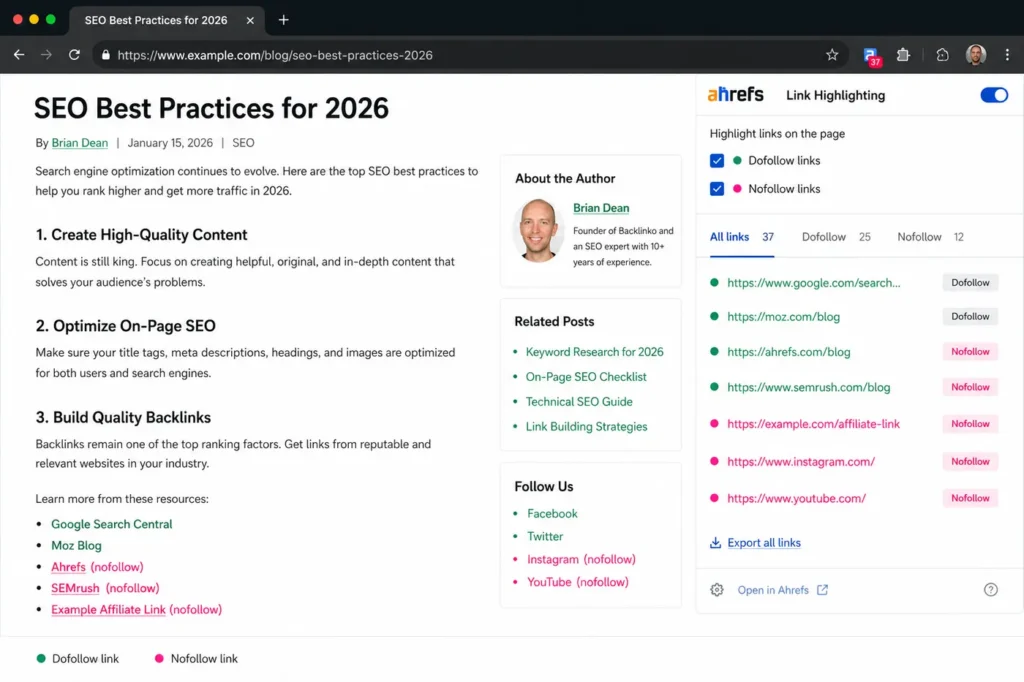
Browser extensions built for this job make it faster across a whole page. Several free Chrome extensions highlight nofollow links in a different color directly on the page, so you can scan a full article without opening dev tools link by link.
A full backlink profile takes more than a link-by-link check. Semrush and Ahrefs both flag the follow status of every backlink in their databases, alongside domain authority and anchor text data. Google Search Console’s Links report shows which sites link to you, though it doesn’t break results down by dofollow versus nofollow status the way third-party tools do.
Outbound nofollow tags matter for a second reason too: crawl budget. A site linking out to hundreds of low-value destinations, even with nofollow attached, still asks Googlebot to spend time evaluating those links. A quick cleanup of outbound link hygiene on high-traffic pages pays off alongside the bigger backlink-building work.
How to Add rel=”nofollow” in WordPress
WordPress doesn’t include a dofollow/nofollow toggle in its standard link popup, but adding the attribute takes one of three routes.
- Edit the HTML directly. Switch the block containing the link to the Code Editor view, or use a Custom HTML block, and add rel=”nofollow” (or rel=”sponsored”, rel=”ugc”) inside the anchor tag.
- Use Yoast SEO for individual links. Yoast adds a “Search engines should ignore this link (mark as nofollow)” checkbox directly to the link insertion popup in the block editor, so you skip manual code link by link.
- Use Rank Math for a site-wide default. Rank Math handles nofollow differently: under General Settings > Links, a Nofollow External Links toggle applies the attribute to every outbound link automatically, with a Nofollow Domains field to exclude specific sites you want to keep dofollow.
For most WordPress sites, Yoast suits editors who want control link by link, while Rank Math suits a set-and-forget site-wide policy. Check which model your plugin uses before applying rel attributes broadly, since a site-wide default can quietly nofollow links you meant to keep dofollow.
Do Dofollow and Nofollow Links Matter for AI Search and GEO?
This is the question almost none of the standard nofollow guides answer, and the real numbers on it only landed in October 2025.
Semrush ran a study with Kevin Indig and Growth Memo analyzing 1,000 domains across five AI platforms: ChatGPT, ChatGPT with Search, Gemini, Google’s AI Overviews, and Perplexity. The finding: nofollow links correlate with AI visibility almost identically to dofollow links, a Pearson correlation of 0.340 for nofollow versus 0.334 for dofollow. Gemini and ChatGPT lean slightly toward favoring nofollow links, while AI Overviews and Perplexity lean slightly toward dofollow.
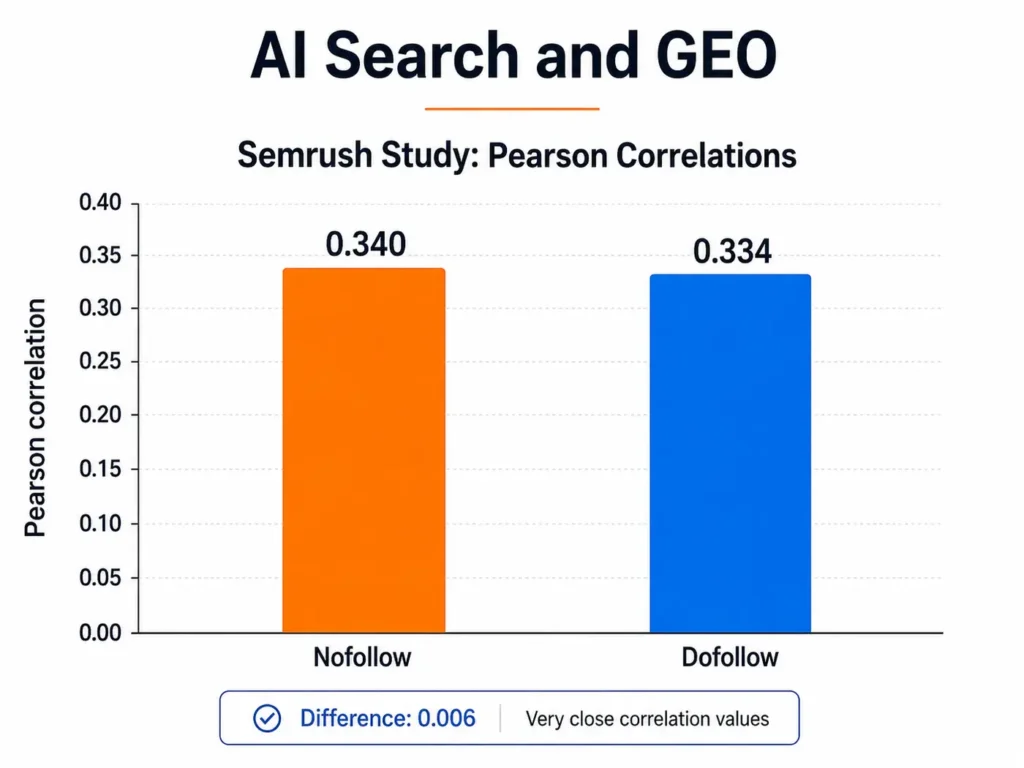
That doesn’t mean link attributes are irrelevant to AI citation, just that the specific follow/nofollow distinction isn’t the lever traditional SEO assumed it was. The same study found two things that matter far more: backlink authority (Semrush’s Authority Score correlated strongly with AI mentions, Pearson 0.65, though gains only show up once a domain clears a higher authority threshold) and image-based backlinks, which correlated more strongly with AI visibility than text links once a site had built some authority.
Domain authority, built in large part through a healthy dofollow backlink profile, still functions as one of the proxies AI engines use to judge whether a source is worth citing. A specific rel attribute isn’t the lever worth chasing for AI visibility; quality mentions are, earned on high-authority sites and backed by genuine answer engine optimization signals like clear sourcing and topical depth.
A Semrush study of 1,000 domains, run with Kevin Indig and Growth Memo, found nofollow and dofollow links correlate almost identically with AI visibility across ChatGPT, Gemini, Perplexity, and Google’s AI Overviews. Backlink authority and content quality predict AI citation far more reliably than whether a specific link happens to be follow or nofollow.
Common Mistakes to Avoid
- Nofollowing every outbound link “to be safe.” Linking out to genuinely trustworthy sources with a plain dofollow link is a positive signal, not a risk. A blanket nofollow policy doesn’t protect link equity. It just wastes it.
- Forgetting sponsored or ugc tags on paid or user-submitted links. A missed affiliate disclosure isn’t just an SEO gap; several regions require disclosure for compensated links regardless of the rel attribute used.
- Trying to revive PageRank sculpting on internal links. That tactic hasn’t worked since June 2009.
- Confusing rel=”nofollow” with rel=”noopener” or rel=”noreferrer.” Those two attributes handle browser security, stopping a new tab from accessing the original page through window.opener, and have nothing to do with ranking signal.
- Ignoring your own backlink profile. A site with an overwhelming share of nofollow inbound links usually signals a profile skewed toward social and directory mentions. That’s not automatically bad, but it’s worth knowing where your authority signal actually comes from.
Where This Fits Into Your Link-Building Strategy
Dofollow and nofollow decisions are one small piece of a much bigger backlink picture. For the fundamentals, including what a backlink actually is and how these link types fit into off-page SEO as a whole, the broader guide to what SEO actually is ties every piece of this back together.
FAQ
Are nofollow links worth building?
Yes. Nofollow links from high-traffic or reputable sites drive referral clicks, build brand visibility, and contribute to a natural-looking link profile. They don’t pass ranking credit the way dofollow links do, but a profile made up entirely of dofollow links can look manipulated to Google’s spam systems.
Can a nofollow link still pass ranking credit?
Rarely, and never as a guarantee. Since March 2020, Google treats nofollow as a hint rather than a directive, meaning its systems can choose to use a nofollowed link as a ranking signal in specific cases. Treat nofollow as “not counted” for planning purposes regardless.
Is there an HTML attribute called “dofollow”?
No. There’s no rel=”dofollow” value in the HTML specification. “Dofollow” is the informal term for a normal link with no rel attribute blocking it. Every link is dofollow by default unless someone marks it otherwise.
Should affiliate links be nofollow?
Use rel=”sponsored” instead where possible. Google introduced this attribute specifically for compensated links, including affiliate links, and recommends it over plain nofollow, though nofollow remains an acceptable fallback if a platform doesn’t support the newer attribute.
How many nofollow links are normal in a backlink profile?
There’s no ratio Google has ever officially published, and independent estimates vary widely by niche. What’s consistent across SEO tool studies is the warning sign at the extreme: a profile that’s close to 100 percent dofollow looks engineered rather than earned. A healthy mix, with a meaningful share of nofollow links from social shares, forum mentions, and directory listings, matters more than hitting any specific percentage.