Most people who search for how to disavow backlinks have already made up their mind before they finish typing the question. A backlink tool just flagged 200 links as “toxic,” and the instinct is to torch the entire list.
Pump the brakes on that. This is a narrow tool built for a narrow set of problems. Treat it like routine maintenance and you’ll strip out link equity you spent months earning. Google itself says most websites never need to touch this feature at all.
That gap between what people assume and what Google actually recommends is where most disavow mistakes start. A backlink audit tool has its own scoring model, and that model has no idea whether a link is actually hurting you in Google’s eyes. It just knows the domain looks unusual.
This guide covers what the disavow tool actually does, the two situations where it genuinely helps, the mistakes that turn a defensive move into a self-inflicted ranking drop, and the exact steps to build a disavow file correctly if your situation calls for one.
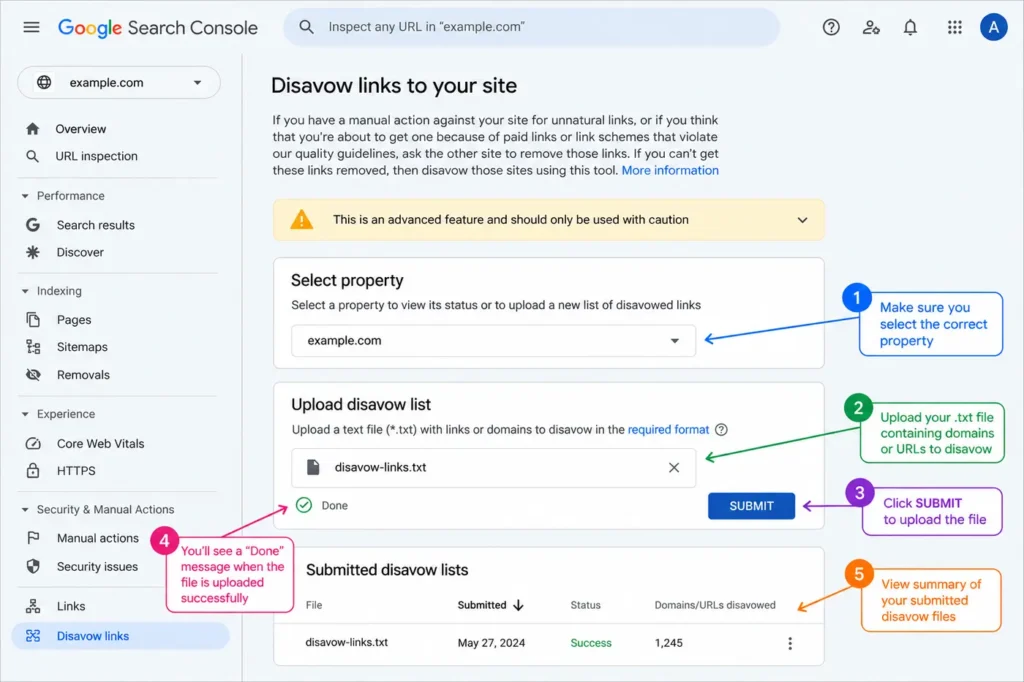
Table of Contents
What Disavowing a Backlink Actually Does
The disavow tool lives inside Google Search Console, under a feature Google itself classifies as advanced and easy to misuse. Google launched it on October 16, 2012, in the wake of the original Penguin update, specifically so websites hit by manual penalties for manipulative link building had a formal way back. You upload a plain text file listing URLs or domains, and you’re asking Google to ignore those links when it evaluates your website’s authority.
Here’s the part that surprises most people: disavowing changes nothing about the link itself. The page still exists. The link still points at your site. Google simply stops counting it as a vote of confidence, and it does this quietly in the background rather than instantly.
The disavow tool tells Google to ignore a specific link when calculating your website’s authority. The link stays live on the web exactly as it was. Google recrawls the disavowed pages over several weeks and adjusts its evaluation, but the source page never changes and the link is never removed.
Account setup matters here too. A domain property behaves differently than a URL-prefix property, and the disavow tool won’t work the way you expect if verification is off. It also won’t apply retroactively to link data you already exported before making changes to your property type. Our Google Search Console setup guide walks through property types and verification if that part isn’t sorted yet.
One more distinction worth nailing down before you go further: disavowing is not the same tool as a nofollow attribute. A nofollow tag sits on the linking page and tells search engines not to pass ranking credit through that specific link, and the website owner controls it. A disavow file runs the opposite direction. The site receiving the link tells Google to ignore it, regardless of whether that link carries a nofollow attribute or not.
When Disavowing Actually Makes Sense
Google’s own guidance narrows this down to two situations, and only two.
First, a manual action for unnatural links. Check the Manual Actions report inside Search Console. If Google has flagged your website specifically for unnatural inbound links, disavowing the offending links alongside a reconsideration request is the standard path back.
Second, a confirmed negative SEO attack. A competitor or bad actor has built a pile of spammy links pointing at your domain, and outreach to get them removed at the source hasn’t worked. A realistic version of this looks like a sudden spike of hundreds of referring domains appearing within days, most of them foreign-language spam or link farm pages with no traffic and no real content, all pointing at the same page on your website.
Outside those two cases, Google is explicit: most websites don’t need this tool at all. Its own ranking systems, including the SpamBrain system that automatically detects manipulative link patterns, are built to spot and discount low-quality links without any help from you. A handful of odd-looking links sitting in your profile rarely trips either of these two conditions on its own.
The broader industry is trending the same direction. Bing removed its own disavow tool entirely in October 2023, with Bing’s Fabrice Canel stating publicly that the platform’s AI had gotten reliable enough at telling natural links from unnatural ones that manual disavowing was no longer necessary. Google hasn’t followed Bing’s lead yet, but the guidance points the same way: lean on the algorithm, and reserve the disavow file for confirmed, specific problems.
Signs of a Backlink Worth Flagging
A link earns a spot on your shortlist when it shows real signs of manipulation, not just an unfamiliar domain name. Watch for:
- Links from private blog networks built purely to pass authority
- Placements on gambling, adult, or foreign-language spam sites with zero topical relevance to your niche
- Sitewide footer or sidebar links that appear on every page of a site
- Spam blog comments or forum signatures with no editorial oversight
- Links you know were paid for and never disclosed
- Backlinks from domains Google has already deindexed
Anchor text matters too. A link with heavily repeated, keyword-stuffed anchor text across dozens of unrelated domains looks manufactured, while one or two odd anchors on an otherwise normal website rarely means anything on their own. Our dofollow vs. nofollow guide, going live August 3, digs deeper into which link types actually pass authority in the first place.
When Not to Disavow
This is where most websites accidentally damage their own rankings, and it happens more often than actual manual actions do.
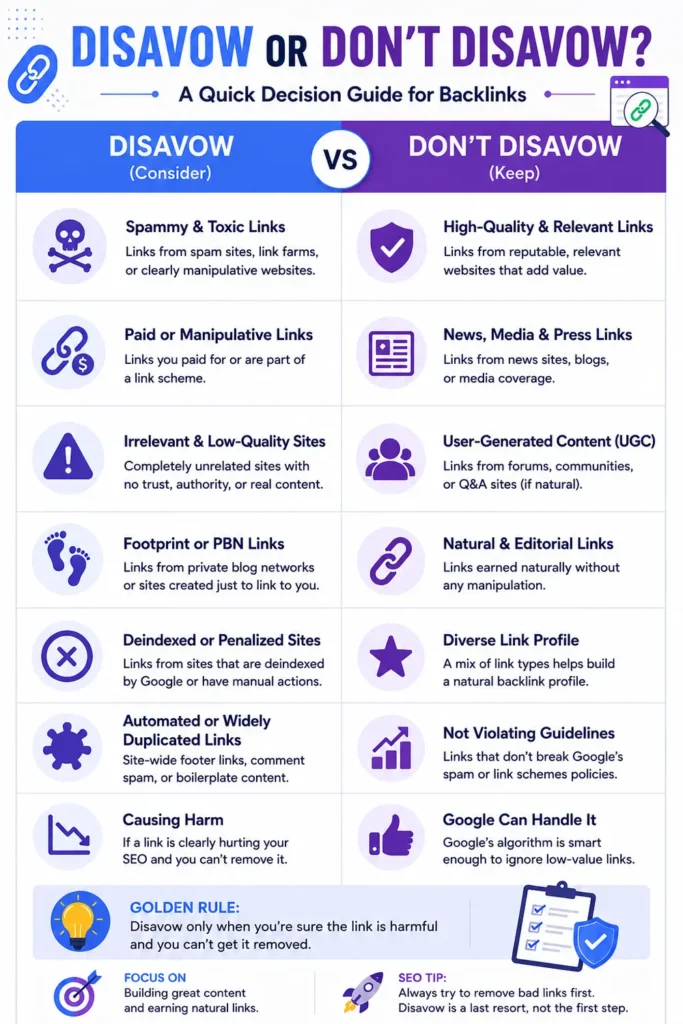
Sites reduce their own authority all the time by disavowing links that were quietly contributing positive signal. A tool’s spam score reflects that tool’s own model, not Google’s actual signal, and a low authority number alone doesn’t make a link harmful. A vague sense of risk is not a reason to remove a link. It costs you real equity and buys you no real protection in return.
This matters more than it sounds like it should, because backlink tools are built to flag first and let a human sort out the nuance later. Ahrefs, Semrush, and Moz each run their own spam or toxicity model, and those models don’t talk to each other or to Google. A link that scores as risky in one tool can look completely fine in another, and neither score reflects what Google’s own algorithm actually thinks of that link.
Google’s own webmaster trends analyst Gary Illyes gave a real example of this at SMX East in 2017: one of his personal sites gets roughly 100,000 visits every two weeks, carries known links from adult sites, and he hasn’t reviewed its backlink profile in two years. He doesn’t run a disavow file on it. He trusts Google’s own filters to sort the noise from the genuine threats, and treats the disavow tool as, in his words, “a big gun” best left alone unless there’s a confirmed reason to use it.
| Situation | Disavow? | Why |
|---|---|---|
| A tool flagged the link as “toxic” | No | Third-party spam scores aren’t Google’s signal |
| Rankings dropped with no clear cause | No | A core update or technical issue is the more likely explanation |
| Link comes from a low-authority but relevant site | No | Low authority isn’t the same as harmful |
| Manual action for unnatural links appears in GSC | Yes | Confirmed, direct cause |
| Confirmed negative SEO attack, removal already failed | Yes | Confirmed, direct cause |
| Quarterly “just in case” cleanup | No | Treats a defensive tool as scheduled maintenance |
How to Build a Disavow File Step by Step
Once you’ve confirmed a genuine case for disavowing, the process itself is mechanical. Get each step right, since a sloppy file can get skipped entirely.
- Pull your full backlink profile from at least two sources. No single tool indexes every link, so cross-reference Ahrefs or Semrush against your Search Console links report.
- Review every flagged link by hand. Click through to the actual page. Confirm it’s genuinely spam, hacked, or part of a link scheme before it goes on your list.
- Try removal first. Email the site owner, ask politely, and keep a record of every attempt. Google wants to see this effort if you ever file a reconsideration request.
- Format the file correctly. Plain text, UTF-8 encoding, one entry per line, a .txt extension. Use domain:example.com to disavow an entire domain, or the full URL to disavow a single page. Lines starting with # are comments Google ignores.
- Choose domain-level or URL-level carefully. A domain that exists purely to host spam deserves a full domain disavow. A single bad page on an otherwise legitimate site usually just needs the one URL.
- Upload through the Search Console disavow tool and select the correct property. A new file replaces your old one entirely, so include everything you still want disavowed, not just the new additions.
- Wait and monitor. Processing takes several weeks as Google recrawls the affected pages. Frequent resubmission of the same file doesn’t speed anything up, and it can reset the clock on files Google is still working through.
# Two pages to disavow
http://spam-example.com/comments.html
http://spam-example.com/paid-links.html

# One domain to disavow
domain:linkfarm-example.com
Common Mistakes That Do More Harm Than Good
- No manual action and no confirmed attack. Real evidence of harm is the only good reason to remove a link. Without it, there’s nothing to protect against.
- A full domain disavow on a site with other legitimate pages. You lose every good link on that domain along with the bad one.
- File formatting mistakes. A malformed file gets rejected outright, and Search Console will show you the exact line that failed.
- Disavow mistaken for a growth strategy. It’s purely defensive. Bad links removed don’t build authority. Good backlinks earned over time do that instead, and no amount of disavow file cleanup substitutes for that work.
- No manual review before submission. A tool’s “toxic” list bulk-exported straight into a disavow file, with no one opening a single flagged page, is how good links end up removed by mistake.
FAQ
Does disavowing remove the backlink from the web?
No. The link stays exactly where it is. The disavow file only tells Google to ignore it when evaluating your site, and Google doesn’t guarantee it will follow every request in the file.
Do I need Ahrefs or Semrush, or does Google Search Console cover this alone?
Search Console’s own links report works for basic checks, but no single tool indexes every backlink on the web. A proper audit cross-references at least two sources, since a link one tool misses might be the one causing a real problem.
How long does a disavow file take to work?
Plan on several weeks. Google needs to recrawl the disavowed pages before the change reflects in how it evaluates your backlink profile, and resubmitting the file more often doesn’t speed the process.
Can disavowing backlinks hurt my rankings?
Yes, if you disavow links that were genuinely helping you. Over-disavowing based on a worried reaction to a long flagged list is one of the more common ways sites accidentally shrink their own authority.
Should I disavow every low-authority link a tool flags?
No. Plenty of real, relevant links come from smaller sites with modest authority scores. Reserve disavowing for links with clear signs of manipulation, not links that simply score low.
What’s the real difference between disavowing a URL and a domain?
A URL-level disavow ignores one specific page. A domain-level disavow ignores every page on that site, which makes sense for domains that exist purely to host spam.
What happens if a toxic-looking backlink profile just gets left alone?
In most cases, nothing negative. Google’s own ranking systems already discount the value of manipulative links automatically. A profile full of unfamiliar domains isn’t the same as a profile causing active harm, and the majority of flagged links fall into the first category rather than the second.
Where Disavowing Fits Into Your Off-Page SEO Strategy
Disavowing protects against a narrow, confirmed problem. It’s cleanup, not growth. The sites that actually move up in rankings spend that same energy earning relevant, high-quality backlinks instead of removing links that were probably contributing nothing either way.
A genuine manual action or a documented attack changes the calculus. Build the file carefully, follow the steps above, and pair it with a reconsideration request where one applies. Absent either of those, the better use of your time sits with outreach, content that earns citations naturally, and the kind of link building our backlink fundamentals guide covers in more depth once it joins this cluster later this month.