If your website isn't showing up on Google, technical SEO issues are often the reason why. It's not the most glamorous part of search engine optimization (SEO), but it's the foundation everything else is built on. Get it wrong, and even the best content in the world won't rank.
This guide breaks down exactly what technical SEO is, why it matters, and the key best practices you need to know to optimize your website — even if you’re starting from scratch.
What Is Technical SEO?
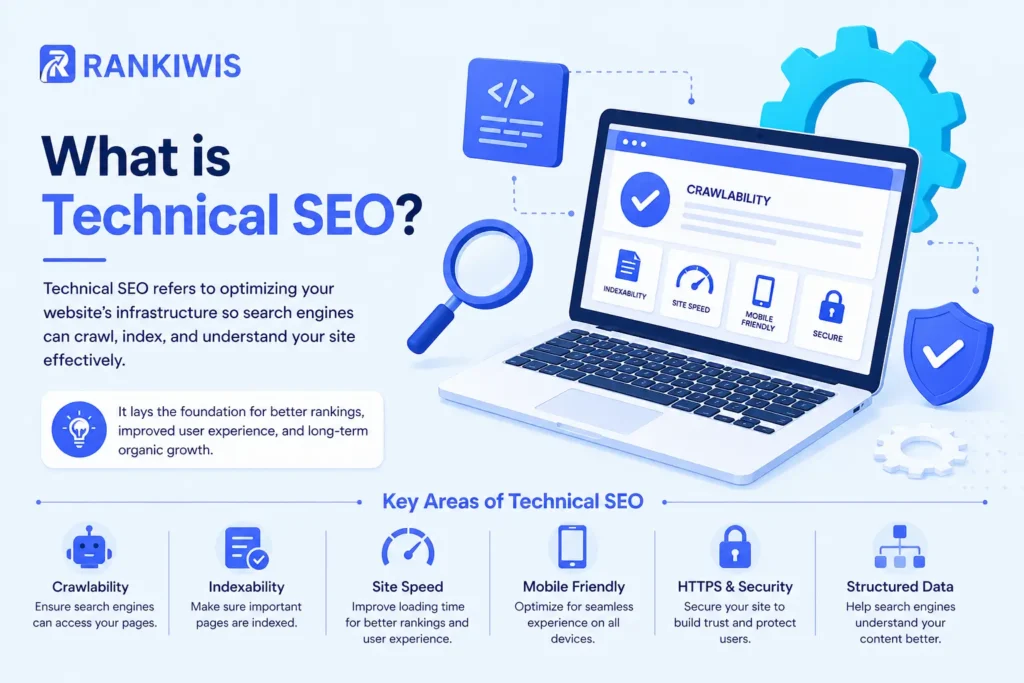
Technical SEO is the process of making sure your website can be found, read, and understood by search engines like Google.
Think of it this way: Google sends bots (called crawlers) to visit websites, read the content, and decide where to rank them in search engine rankings. Technical SEO removes the obstacles that stop those bots from doing their job properly.
It covers things like website speed and load times, mobile friendliness, site architecture, and whether Google can access all your relevant pages in the first place.
As John Mueller, Google’s Search Advocate, has put it: good technical SEO means making it easy for Google to find, crawl, and index your content — everything else flows from that.
Without a solid technical foundation, even a well-written, well-designed site can struggle to achieve strong search engine rankings. If you’re new to SEO, it helps to first understand how search engines work and what SEO actually involves before diving into the technical side.
Why Is Technical SEO Important?
Google’s job is to give users the best possible results. That means it favors websites that are fast, secure, and easy to navigate. Technical SEO is important because it directly affects whether Google can trust and rank your site.
A technically sound website signals quality. A slow-loading, broken, or hard-to-crawl site signals the opposite and users notice too. High bounce rates, poor click-through rates, and short session times all tell Google that your site isn’t delivering a good experience.
Technical SEO also matters for AI search. Tools like ChatGPT, Google’s AI Overviews, and Bing Copilot pull information from pages they can clearly parse and understand. Structured, well-organized content is far more likely to be cited by AI-powered search results. Understanding zero-click searches and how AI Overviews work is increasingly important for any site trying to capture visibility in modern search.
Rand Fishkin, founder of Moz, has long argued that technical SEO forms the bedrock of any site’s visibility — fix the technical issues first, and your content and link-building efforts will compound far more effectively.
In short: technical SEO is important because it determines whether any of your other SEO work actually pays off.
Core Technical SEO Best Practices
1. Make Sure Google Can Crawl and Index Your Site
Before anything else, check that Google can actually access your pages.
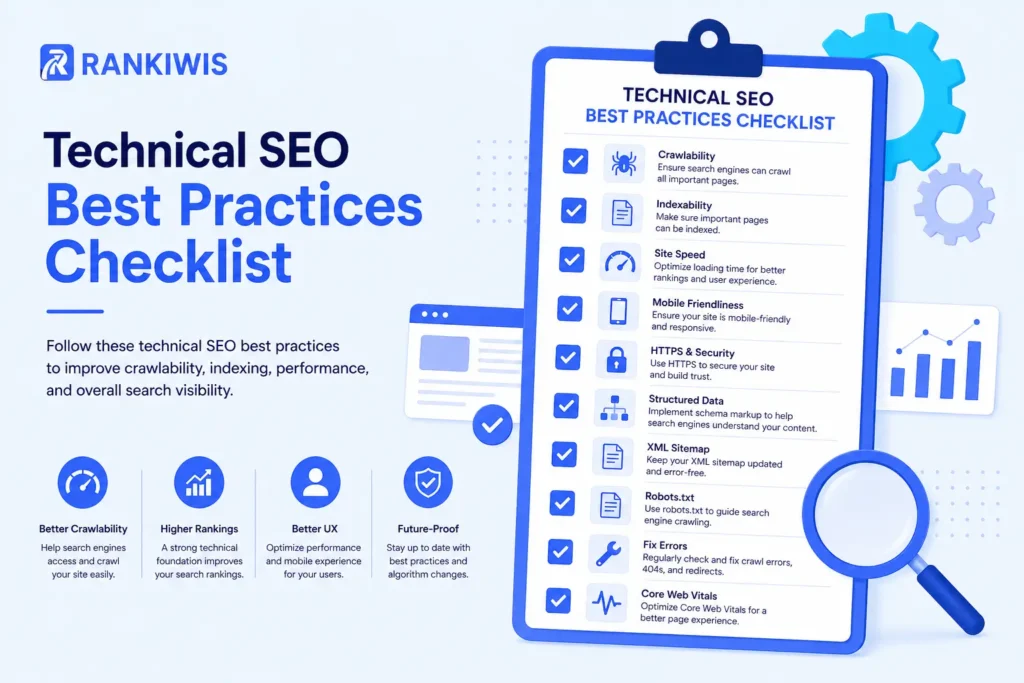
Crawlability means search engine bots can visit your pages. Indexability means those pages can be saved and shown in search results. Both are essential for improving your search engine ranking.
Common technical SEO issues that block this include:
- A
noindextag on pages you want to rank - Blocked URLs in your
robots.txtfile - Broken internal links that create dead ends
- Poor site architecture that buries relevant pages too deep
Tools like Google Search Console (it’s free) let you check which pages are indexed and flag any crawling errors quickly.
2. Sort Out Your Site Architecture
Site architecture refers to how your pages are organized and linked together. A well-planned structure means Google can find and understand all your relevant pages without difficulty.
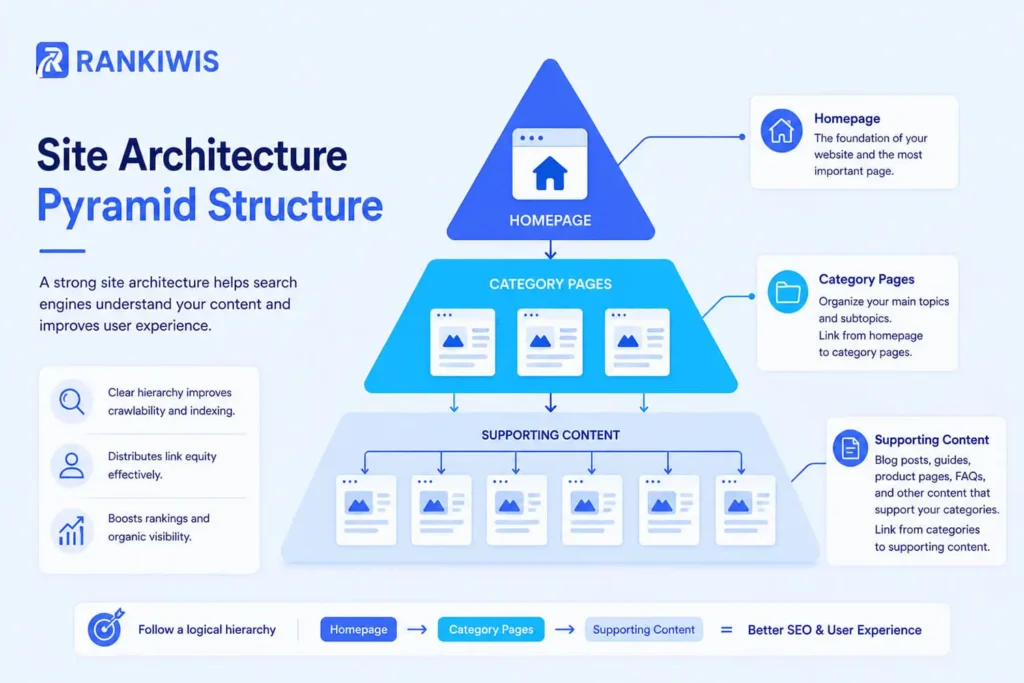
Think of it as a pyramid. Your homepage sits at the top. Below it are your main categories or service pages. Below those are your supporting pages and blog posts. Every level should link clearly to the next.
Good site architecture also has a direct impact on click-through rates. When Google understands your structure, it’s better able to show the right pages for the right searches — which means more relevant traffic clicking through to your site.
Neil Patel, one of the most recognized voices in search engine optimization SEO, has consistently noted that a flat, well-linked site architecture gives every page a stronger shot at ranking because link authority flows more evenly across the site.
3. Submit an XML Sitemap
A sitemap is a file that lists all the important pages on your site. It acts like a map for Google’s crawlers, making it easier to find and index your content — particularly new pages or relevant pages buried deeper in your site architecture.
Create an XML sitemap and submit it using tools like Google Search Console. Most website platforms (WordPress, Wix, Shopify) can generate one automatically.
4. Switch to HTTPS
If your site still uses HTTP instead of HTTPS, fix it now. Google treats HTTPS as a ranking signal, and browsers flag HTTP sites as “Not Secure,” which damages trust and drives up bounce rates.
Get an SSL certificate (many hosts provide one free) and make sure your entire site redirects to the HTTPS version.
5. Improve Website Speed and Load Times
Website speed is one of the most direct ways to optimize your website for both Google and your visitors. Slow-loading pages rank lower and lose visitors fast — research consistently shows that most people will leave a page if load times exceed three seconds.
Slow loading pages also hurt your click through rate indirectly. Google measures user behavior signals over time. If visitors bounce quickly, Google notices — and your search engine ranking suffers for it.
Run your site through Google’s PageSpeed Insights to see where you stand. Common fixes include:
- Compressing images before uploading
- Reducing unnecessary JavaScript and CSS
- Enabling browser caching
- Using a content delivery network (CDN)
6. Fix Core Web Vitals
Core Web Vitals are Google’s set of user experience metrics, and they’re a confirmed page SEO ranking factor. There are three key measurements:
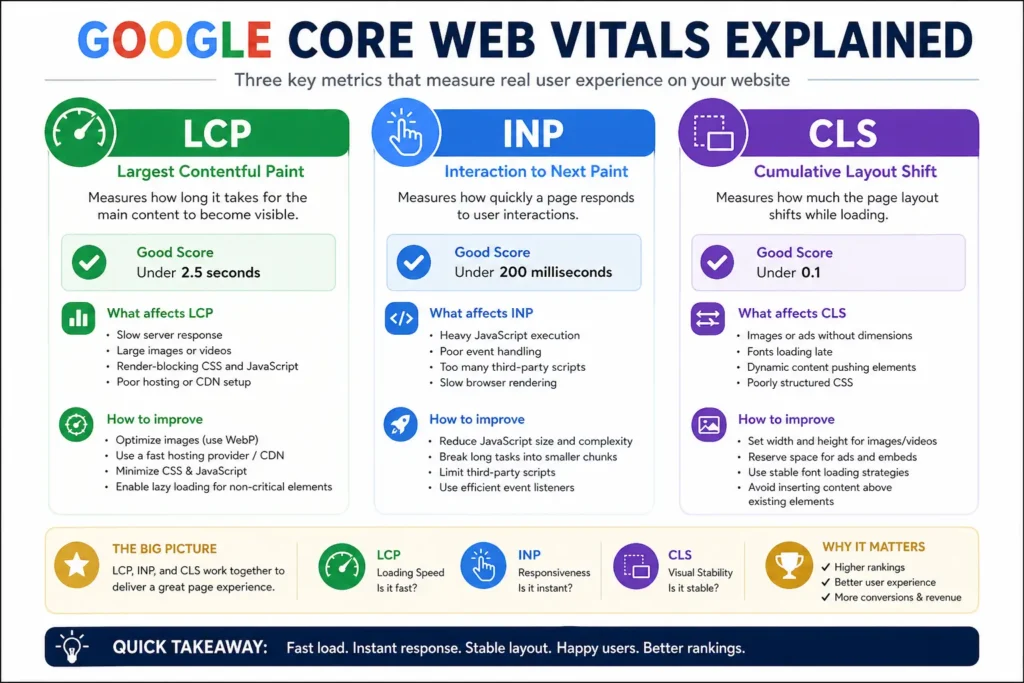
- Largest Contentful Paint (LCP): Measures how fast the largest visible element — usually a hero image or headline — loads on screen. Aim for under 2.5 seconds. Poor largest contentful paint is one of the most common technical SEO issues on image-heavy sites.
- Interaction to Next Paint (INP): Replaced First Input Delay (FID) as Google’s measure of page responsiveness. Where input delay FID measured only the first interaction, INP tracks all interactions across the session. Aim for under 200ms.
- Cumulative Layout Shift (CLS): Measures how stable your page is as it loads. A high cumulative layout shift score means page elements are jumping around — frustrating for users and a signal Google penalizes.
You can check all three scores in Google Search Console under the “Experience” section.
7. Optimize for Mobile Friendliness
More than half of all web traffic comes from mobile devices. Google uses mobile-first indexing, which means it looks at the mobile version of your site first when deciding how to rank it.
Mobile friendliness isn’t just about whether your site technically works on a phone. Buttons need to be tappable, text needs to be readable without zooming, and load times on mobile networks need to be fast. Poor mobile experiences push up bounce rates and damage your overall search engine ranking.
Test your site using Google’s Mobile-Friendly Test tool and fix any issues it surfaces before doing anything else.
8. Tackle Duplicate Content Issues
Duplicate content issues happen when the same or very similar content appears on more than one URL. Google struggles to decide which version to rank — and often ranks neither of them well.
Common causes of duplicate content issues include:
- HTTP and HTTPS versions of the same page both being live
- www and non-www versions both accessible
- URL parameters creating multiple versions of the same page (e.g.
/trainersand/trainers?sort=price)
Setup canonical tags to tell Google which version of a page is the authoritative one. This resolves most duplicate content issues without needing to delete or merge pages.
9. Use a Clean URL Structure
Your URLs should be short, readable, and descriptive. A good URL tells both users and search engines what the page is about before they click on it — which directly supports higher click-through rates.
Good: yoursite.com/technical-seo-guide
Bad: yoursite.com/p=1042?ref=home
Avoid dates, random numbers, or unnecessary parameters in your URLs. Keep them consistent with your site architecture so relevant pages are easy to locate and link to. The same principle applies to on-page SEO elements like meta descriptions — clarity and relevance matter at every level.
10. Implement Structured Data (Schema Markup)
Implementing structured data is one of the highest-impact technical SEO improvements you can make for both Google and AI search.
Schema markup is code added to your pages that helps search engines understand your content more precisely. It’s what powers rich snippets — the enhanced results you see in Google with star ratings, FAQs, prices, and review counts displayed directly in the search results. Google displays 21 different types of search results on SERPs, and structured data is the key to unlocking many of them.
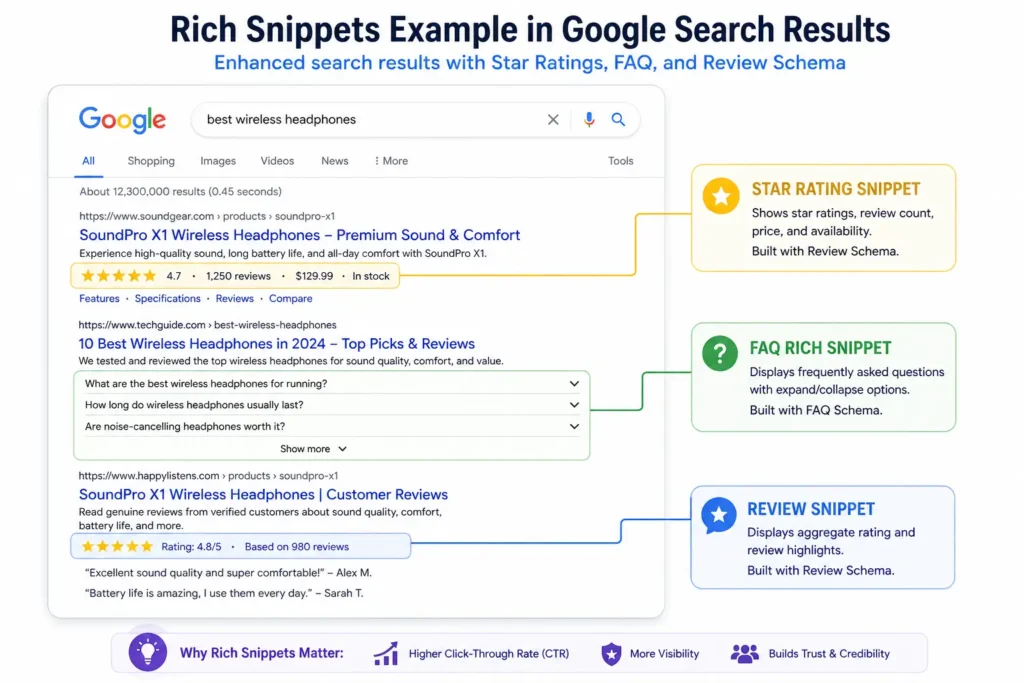
Rich snippets significantly improve click-through rates. A result with a star rating and review count visible in the listing will consistently outperform a plain blue link, even if both rank in the same position.
Implementing structured data also helps AI tools cite your content more accurately. When AI search tools like Perplexity or Google’s AI Overviews pull answers from the web, pages with clear schema markup are easier to interpret and more likely to be referenced.
You don’t need to code it manually. Tools like Google’s Structured Data Markup Helper or plugins like Rank Math (for WordPress) make implementing structured data straightforward.
Barry Schwartz of Search Engine Roundtable has observed that structured data is increasingly becoming a differentiator in search — sites implementing it properly are seeing measurable gains in both rich snippets and AI search visibility.
11. Build a Strong Internal Linking Structure
Internal links connect your pages to each other. They help Google discover new content, understand the relationships between relevant pages, and determine which pages carry the most authority within your site architecture.
Every page on your site should be reachable within a few clicks from your homepage. Orphaned pages ones with no internal links pointing to them are much harder for Google to find, which makes them far less likely to rank.
Good internal linking also lowers bounce rates by guiding visitors to related content they’re likely to find useful. For example, a post on technical SEO naturally links to your on-page SEO guide and your keyword research guide — because readers who want to understand one usually need the others too.
12. Fix Broken Links and Redirect Errors
Broken links (pages returning a 404 error) create a poor user experience, increase bounce rates, and waste your crawl budget — the number of pages Google’s bots will visit in a given period.
Use a tool like Screaming Frog or Ahrefs to scan for broken links regularly. When a page moves or is deleted, set up a 301 redirect to send both users and bots to the correct page instead. This is also worth considering alongside your off-page SEO strategy since broken external links pointing to your site waste link equity you’ve already earned.
Tools Like Google Search Console: What You Actually Need
You don’t need to spend heavily to get on top of technical SEO issues. These are the tools worth knowing:
- Google Search Console: free, essential, and the best starting point. Shows which pages are indexed, flags crawl errors, and reports on Core Web Vitals.
- Google PageSpeed Insights: checks website speed and load times, with specific fixes suggested.
- Screaming Frog: crawls your site and surfaces technical SEO issues (free up to 500 URLs).
- Ahrefs or Semrush: paid tools with deeper auditing, keyword data, and backlink tracking.
- Rank Math or Yoast: WordPress plugins that handle many technical basics, including implementing structured data, automatically.
For a broader view of how these fit into a full SEO strategy, the ultimate guide to SEO covers everything from technical foundations through to content and link building.
Common Technical SEO Mistakes to Avoid
- Launching a site without checking that indexing is switched on
- Leaving both HTTP and HTTPS versions of your site live, causing duplicate content issues
- Not testing mobile friendliness before launch
- Leaving image files large and uncompressed, slowing load times
- Ignoring cumulative layout shift and largest contentful paint scores
- Forgetting to submit a sitemap via tools like Google Search Console
- Skipping structured data and missing out on rich snippets
How Technical SEO Fits Into the Bigger Picture
Technical SEO is the foundation. Once it’s in place, the other parts of search engine optimization (SEO) — content, keywords, backlinks — can actually do their job.
A site with great content but poor site architecture and slow load times is like a beautifully stocked shop with a locked front door. Sorting out the technical side first means everything else has a proper chance to work.
If you’re starting a new website, getting the technical basics right from day one saves significant rework later. If you have an existing site with low click-through rates, high bounce rates, or stalling traffic, a content audit for SEO alongside a technical audit is often the right first step.
Final Thoughts
Technical SEO isn’t as complicated as it sounds. At its core, it’s about making sure your website is fast, accessible, secure, and structured in a way that search engines can properly understand.
Start with the essentials: HTTPS, a sitemap, mobile friendliness, and tools like Google Search Console. Work through Core Web Vitals — largest contentful paint, cumulative layout shift, and input delay — and tackle any duplicate content issues you find. Then layer in implementing structured data to capture rich snippets and improve click-through rates.
The sites that sit at the top of search engine rankings aren’t always the ones with the biggest budgets or the most content. They’re the ones that got the technical SEO basics right — and kept them right as the site grew.
Need help identifying and fixing technical SEO issues on your website? Contact us to find out how we can help.