Header tags are one of the simplest SEO wins you can make, and one of the most misused. Get them right and your page becomes easier to read, easier for Google to understand, and easier for AI search tools to quote. Get them wrong and even good content can read like a wall of text.
This guide keeps it plain: what header tags are, why they matter, and exactly how to use H1, H2 and H3 on your pages.
What Are Header Tags?
Header tags are HTML headings, written as H1 through to H6, that label the sections of a web page. The H1 is the main title. H2 and H3 break the content into sections and sub-sections, a bit like chapter titles and sub-headings in a book. They help people scan a page, and they help search engines understand how your content fits together.
You’ll also hear them called heading tags. Same thing. On most website builders, you set them with the paragraph style menu, choosing Heading 1, Heading 2 and so on, rather than typing code.
Why Do Header Tags Matter for SEO?
Headings do three jobs at once.
They help readers. Most people scan before they commit. Clear headings let someone find the part they came for in seconds, which keeps them on the page longer.
They help Google. Search engines read your headings to work out what each section covers and how the page is organized. A tidy structure makes it easier for Google to match your page to a search.
They help AI search. Tools like Google’s AI Overviews and Perplexity pull short answers straight out of pages, and headings phrased as questions, with a clear answer underneath, are exactly what these tools look for. That’s not a hunch: Foundation Marketing’s March 2026 analysis found that 68.7% of ChatGPT citations come from pages with a clean H1-to-H2-to-H3 hierarchy. Good heading structure is now one of the cheapest ways to get quoted in an AI answer, and our guide on how AI engines actually read your pages covers the rest of what drives that.
How Many H1 Tags Should a Page Have?
One. Use a single H1 per page for the main title.
HTML5 technically allows more than one, and Google has said a page with several H1s won’t be penalized. But one H1 keeps your main topic crystal clear for readers and search engines, and it removes any doubt about what the page is about. Treat the H1 as the headline of a news story: one per page, and it names the subject.
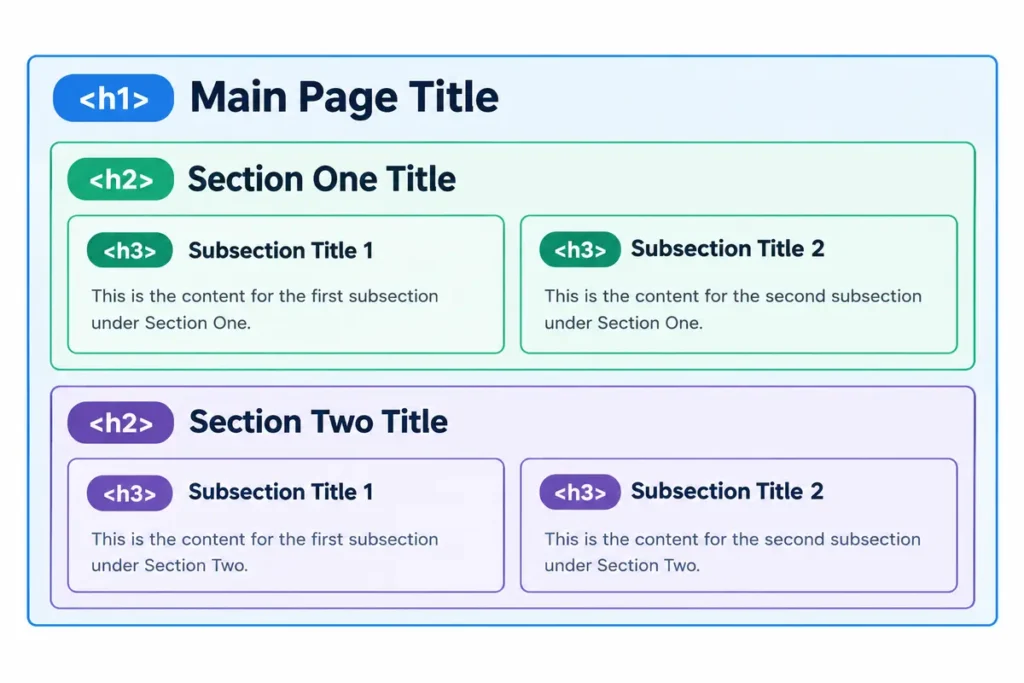
H1 vs H2 vs H3: What Each One Does
Think of headings as a set of nested boxes. The H1 holds everything. H2s sit inside it. H3s sit inside an H2.
| Tag | Job | Example on this page |
|---|---|---|
| H1 | The page’s main title. One only. | Header Tags (H1, H2, H3): How to Use Them for SEO |
| H2 | A main section under the H1. Use as many as the content needs. | Why Do Header Tags Matter for SEO? |
| H3 | A sub-point under an H2. | (A point breaking down a section) |
| H4 to H6 | Deeper sub-points. Rarely needed for a blog post. | Used only in very detailed guides |
The order matters. Move down the levels in sequence and never jump from an H2 straight to an H4. A skipped level confuses screen readers and muddies the structure for search engines.
How to Use Header Tags: Seven Practical Rules
Follow these and your headings will do their job on every page.
- Write one clear H1. Put your main keyword in it and write it for a human first. Your H1 can differ slightly from your meta title, and often should.
- Use H2s for each main section. Every big idea on the page gets its own H2. This post uses one H2 per question.
- Use H3s only when a section splits. If an H2 section has two or three distinct points, give each an H3. If it doesn’t, leave them out.
- Keep the hierarchy in order. H1, then H2, then H3. No skipped levels.
- Phrase headings the way people search. “How Many H1 Tags Should a Page Have?” beats “H1 Quantity.” Question-style headings win featured snippets and AI citations.
- Work keywords in naturally. Aim to include a keyword or close variant in roughly a third of your H2s, and pair it with solid keyword research so the terms you’re targeting actually match what people search. Never stuff every heading with the same term.
- Skip the fake heading. A bold, oversized line isn’t a heading. Use the real heading tag so search engines and screen readers recognize it.
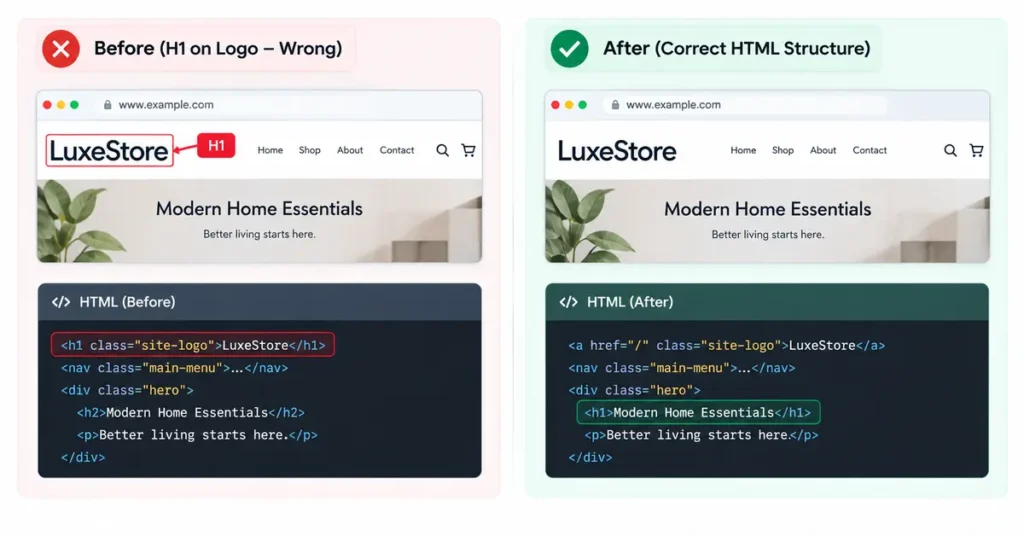
Common Header Tag Mistakes
A few errors show up again and again in the audits we run.
Some WordPress themes apply the H1 tag to the site logo or the site name by default, which means a page quietly ends up with two H1s. Check your theme settings for this before you touch the content.
Heading levels chosen for looks instead of meaning are another common trap. Some people pick H3 because they like how it looks, then wonder why the structure is a mess. Style with CSS, structure with the correct tag.
Long, vague headings don’t help either. “Some Things Worth Considering” tells nobody anything. Say what the section covers.
And plenty of pages have no headings at all. A 1,200-word post with two headings is hard to scan and hard to rank. Break it up.
Do Header Tags Help With AI Search?
Yes, and this is where headings earn their keep in 2026. AI models read headings to find the topics, questions and answers on a page, then lift the clearest ones into their summaries. A page built around question-style headings with a tight answer under each is far more likely to be quoted than a page of unbroken paragraphs. Headings are one of the cheapest levers you have for AI visibility, and they cost nothing to fix.
Want the full picture on page structure? Our on-page SEO guide covers headings alongside titles, meta descriptions, internal links, and a complete optimization checklist you can run against any page on your site.
Frequently Asked Questions
How many H1 tags should a page have?
One. A single H1 keeps your main topic clear for readers and search engines. HTML5 allows more, and Google won’t penalize extra H1s, but one is the safest and cleanest choice.
Is the H1 the same as the title tag?
No. The title tag is what shows in the browser tab and in Google’s search results. The H1 is the headline on the page itself. They often say similar things, but you can and often should word them differently.
Do header tags affect SEO?
Yes, indirectly. Headings help Google understand your content and help readers stay on the page, both of which support rankings. They also make your content easier for AI search tools to quote.
Can I skip from an H2 to an H4?
Avoid it. Move down heading levels in order (H1, H2, H3) without skipping. A skipped level confuses screen readers and weakens the structure for search engines.
Do headings matter for AI search?
They matter a lot. AI Overviews and tools like Perplexity use headings to find and extract answers. Question-style headings with a clear answer underneath give you the best shot at being cited.
Want your pages structured to rank and get cited?
A quick on-page review often turns up header tag issues in minutes. Book a free consultation with Rankiwis: no pitch, just a clear look at what’s holding your pages back.