Most blog posts fail for the same reason. Someone picks a topic they find interesting, writes 800 words about it, hits publish, and waits. Six months later it has had eleven visits, nine of which were the author checking.
An SEO-friendly blog post comes from a process, not a talent. Follow the eight steps below and your posts will start turning up in search results, and increasingly in AI answers too.
Table of Contents
What Makes a Blog Post SEO-Friendly?
An SEO-friendly blog post targets a keyword people actually search, matches the intent behind that search, and uses a clear heading structure so readers and search engines can follow it. It answers the main question early, includes original detail, and covers the on-page SEO basics like titles, links and images.
Notice what is missing from that definition. Word count. Keyword density. Any mention of writing “for the algorithm.” Those were the rules a decade ago and they are noise now.
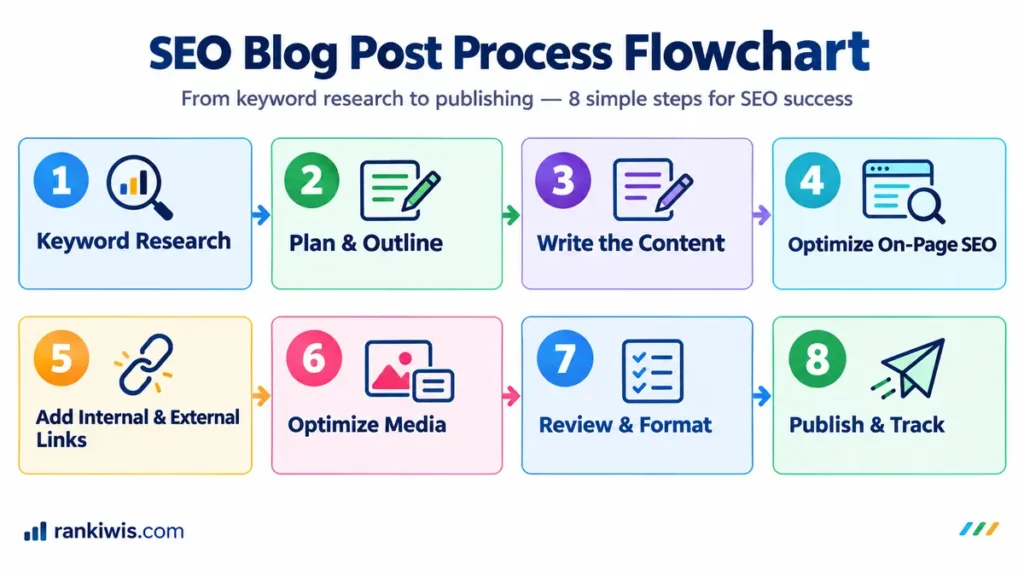
Step 1: Pick a Keyword People Actually Search
Start with demand, not inspiration. A post targeting a term nobody searches cannot rank for anything useful, no matter how well written it is.
Look for terms with real search volume and a level of competition you can realistically compete for. A new site is better off chasing specific, longer phrases like “how much does SEO cost for a small business” than broad ones like “SEO.” Keyword research tools such as Semrush and Ahrefs show volume and difficulty for each phrase.
Pick one primary keyword per post. Three or four closely related supporting terms are fine. Ten unrelated ones are not.
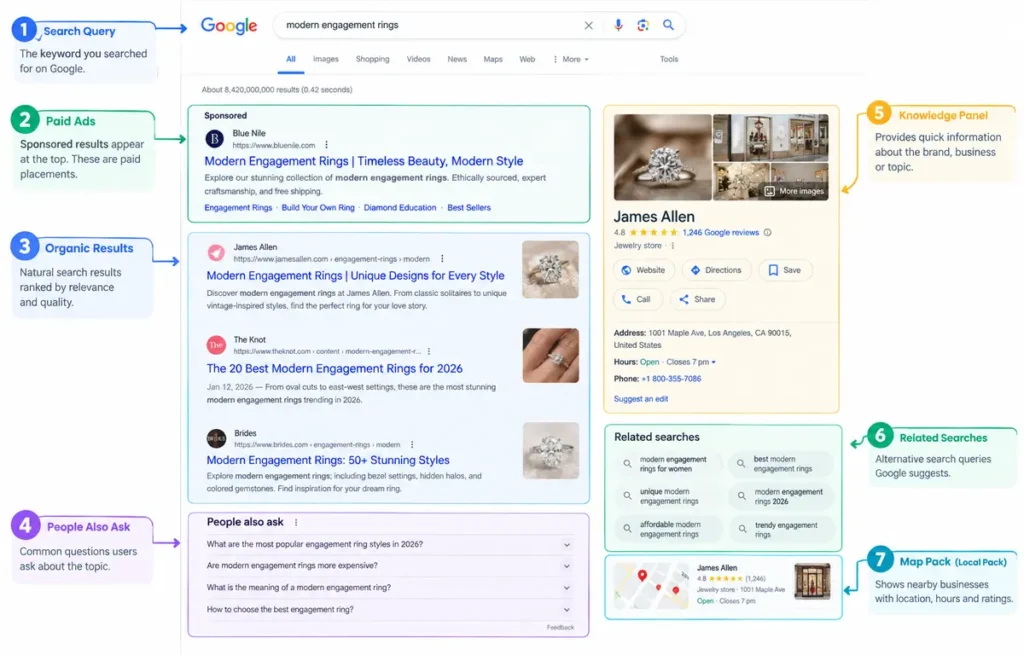
Step 2: Read the Search Results Before You Outline
This is the step nearly everyone skips, and it decides more outcomes than anything else on this list.
Search your keyword and look at what is already ranking. The results page tells you what Google believes searchers want. If the top ten are all comparison tables and you write a personal essay, you will not rank, because you have answered a different question.
Check three things:
- Format. Are the winners guides, listicles, comparison pages, or product pages? Match the dominant format.
- Depth. Roughly how long and how detailed are they? Aim to be a little better, not three times longer.
- Questions. Note the People Also Ask boxes. Each one is a section or an FAQ entry for your post.
Then ask whether Google is showing an AI Overview. If it is, read which sources it quotes. Those are the pages you need to out-answer.
Step 3: Outline with Headings Before You Write
Build the skeleton first. One H1 for the title, an H2 for each main section, H3s where a section splits into sub-points.
Phrase headings the way people actually search. “How Long Should an SEO Blog Post Be?” works far better than “Length Considerations,” both for readers scanning and for AI engines hunting for answers. Where a People Also Ask question fits a planned section, use its exact wording.
Our guide to header tags covers the hierarchy rules in detail. Get this right and the writing gets easier, because you fill in a structure instead of staring at a blank page.
Step 4: Answer the Main Question in the First 100 Words
Readers decide in seconds whether a page will help them. Search engines and AI tools look for the answer just as fast.
Give the answer up front, then expand. Save the background, the history, and the throat-clearing for later, or cut it entirely. A post that opens with “Search engine optimization has changed dramatically over the years…” has already lost half its readers.
Write that opening answer as a self-contained block of about 40 to 60 words. It should make sense quoted on its own, with no preceding sentence needed. That single habit gives you the best shot at featured snippets and AI citations.
Step 5: Write with Specifics, Not Generalities
Specific detail is what separates content that ranks from content that fills space.
In December 2022, Google added Experience to its quality rater guidelines, so raters now weigh first-hand involvement with a topic alongside expertise. Google also notes that these guidelines help evaluate its ranking systems and do not directly influence ranking. Still, the message is clear: content written by someone who did the thing reads as more trustworthy.
So use real numbers, real examples, and real outcomes. A line like “We audited 40 trade sites last year and found two-thirds had no meta descriptions” carries weight, as long as the numbers are yours. “Many businesses neglect their meta descriptions” carries none. Name the tools you use. Describe what went wrong as well as what worked. Add your own photos rather than stock images.
This is also what builds E-E-A-T, which matters more each year as AI engines decide which sources to trust.
Step 6: Cover the On-Page Basics
None of these take long, and skipping them wastes the writing you have already done.
| Element | Target | Why it matters |
|---|---|---|
| Title tag | Around 55 to 60 characters, keyword near the front | Decides whether people click in search results |
| Meta description | Around 150 to 160 characters, active voice | Influences click-through, though Google may rewrite it |
| URL slug | Short, lowercase, hyphenated, keyword-led | Cleaner for users and easier for search engines |
| H1 | One per page, contains the primary keyword | Names the topic clearly |
| Internal links | Two to four, descriptive anchor text, placed in the body | Spreads authority and keeps readers on site |
| External links | One or two to credible sources | Supports claims and builds trust |
| Images | Descriptive file names, alt text, WebP format | Improves accessibility, speed, and image search |
Character counts here are practical rules of thumb rather than hard limits, since Google truncates on pixel width and varies by device. Our guides to title tag optimization and image SEO cover two of these rows in depth.
Step 7: Format So AI Engines Can Quote You
Search traffic is shifting toward AI-generated answers, and the formatting that wins citations is slightly different from what wins clicks.
Four habits do most of the work:
- Write self-contained answers. Each key point should make sense lifted out of context.
- Use question headings. They mirror how people phrase queries to AI tools.
- Add a FAQ section. Three to eight questions, phrased how people actually ask them, with answers of roughly 40 to 60 words.
- Include a table on anything comparative. Rows and columns give AI tools clean pieces to lift.
A note on schema. Google stopped showing HowTo rich results in 2023, and FAQ rich results stopped appearing on May 7, 2026. Both markups can stay on a page without causing problems, but expect no visible search benefit. Article and Author markup matter more.
Step 8: Publish, Then Track and Improve
Publication marks the middle of the process, not the end.
Submit the URL in Google Search Console so it gets crawled. Add internal links to it from two or three existing posts on related topics, which helps Google find it and passes authority across. Then leave it alone for six to eight weeks before judging it, because new content rarely settles quickly.
After that, check Search Console for the queries it is picking up. Often a post ranks on page two for a term you never targeted, and a small edit moves it up. That is where the real gains sit, and it is why you should optimize each post after publishing rather than move straight to the next piece.
Common Mistakes to Avoid
- A keyword chosen without checking its results page first.
- A post padded to hit an imagined word count.
- The same keyword repeated forty times.
- No internal links, leaving the post orphaned.
- No author byline on a topic where credibility matters.
- A post judged a failure after just ten days.
Frequently Asked Questions
How long should an SEO blog post be?
Long enough to answer the question properly and no longer. Check the top-ranking pages for your keyword and aim for a similar depth with better structure. No single word count wins every time. A post padded to hit a number does more harm than good.
How many keywords should one blog post target?
One primary keyword, plus three or four closely related supporting terms. A single post targeting many unrelated keywords usually ranks well for none of them. Give separate topics their own pages.
How do I know what search intent to write for?
Search your keyword and study the top ten results. Their format tells you what Google thinks searchers want. Guides mean informational intent, product pages mean transactional. Match the dominant format rather than guessing.
Do blog posts still help SEO in 2026?
Yes, though the goal has broadened. Blog posts still earn rankings and links, and they give AI tools clear answers to quote. Thin, generic posts published for volume no longer work.
How often should I publish blog posts?
Consistency beats frequency. One well-researched post every two weeks outperforms four rushed ones a month. A slower schedule also leaves time to update older posts, which often returns more traffic than new content.
How do I get my blog post quoted by AI?
Answer questions directly in self-contained blocks of 40 to 60 words, use question-style headings, add an FAQ section, and include original data or first-hand detail. AI engines quote clear, specific, well-sourced answers.
The Short Version
Pick a keyword people search. Read the results page. Outline with real headings. Answer early. Add detail only you can offer. Cover the basics. Format for quoting. Then track and improve. Run these eight steps on your next post and compare it with your last one.
Want a content plan that targets real demand? Rankiwis builds SEO content strategies for growing businesses. Book a free strategy session.