Most rank trackers charge a monthly fee. That fee adds up fast when you only watch a few dozen keywords. The good news: you can track keyword rankings for free, and the best free source is also the most accurate one, Google’s own data.
It lives inside Google Search Console. It shows what real people saw in real searches, not what a bot saw on one test search. Bing offers the same kind of report for its own results, and a simple spreadsheet turns both into a long-term record.
The catch is that free tracking works differently from paid tools. This guide shows you how to set it up, how to read the one number most people misread, and when a paid tool starts to earn its price.
Table of Contents
Can You Track Keyword Rankings for Free?
Yes. Google Search Console reports the average position of your pages for every search where they appeared, using Google’s own data, at no cost. Bing Webmaster Tools does the same for Bing. Add a monthly spreadsheet and you get a full ranking history without a subscription.
Free tracking has two limits. It only shows searches where your site already appeared, and it never shows competitor positions. Both limits come up again near the end, so you can decide whether they matter for your website.
Why Is Google Search Console the Best Free Rank Tracker?
Google Search Console is the best free rank tracker because it reports real searches, not test searches. It shows impressions, clicks, click-through rate and average position from Google’s own data, and it keeps 16 months of history. Paid tools run their own test searches. Search Console shows where real people saw you.
The report gives you more than a rank:
- Impressions: how often your result appeared.
- Clicks: how often people chose it.
- Click-through rate (CTR): clicks divided by impressions, by Google’s own definition.
- 16 months of history. Google Analytics Help confirms that Search Console keeps data for the last 16 months.
New to the tool? Start with our beginner’s guide to Google Search Console, then come back here.
How Do You Track Rankings in Google Search Console?
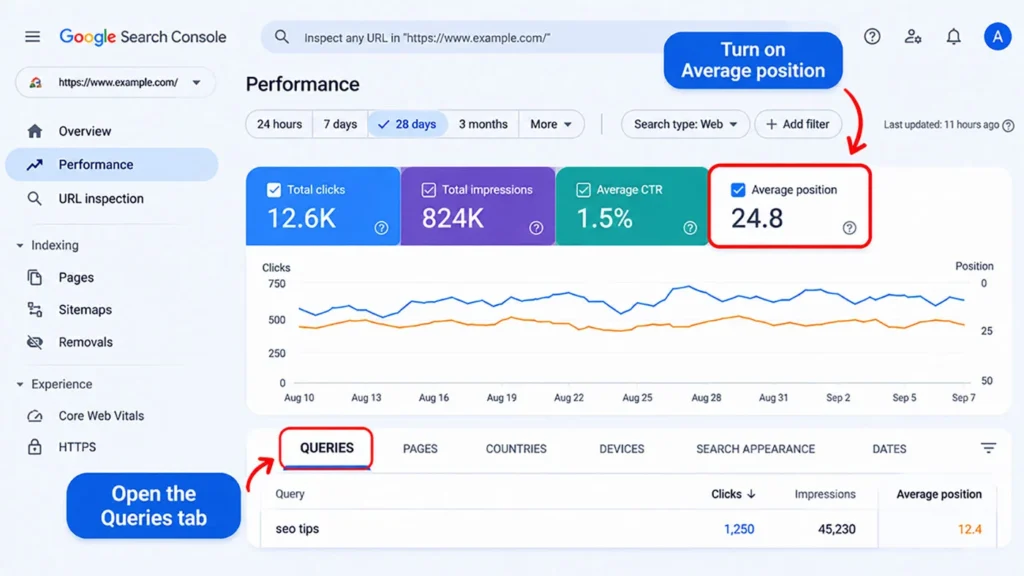
Open the Performance report in Google Search Console and switch on Average position. Open the Queries tab to see the position for each keyword. Add a query filter to check one keyword, then export the data each month into a spreadsheet to track changes over time.
Here are the steps in order:
- Open Search Console and choose your property.
- Go to Performance, then Search results.
- Click the Average position box above the chart. Google’s Performance report help page says average position does not show by default, so you have to switch it on.
- Pick a date range. The default covers the past three months. A shorter window, such as 28 days, makes month-to-month checks easier.
- Open the Queries tab. Every search your site appeared for shows up with its metrics.
- Add a query filter to check one keyword. Type the exact phrase.
- Use Compare in the date filter to line up this month against last month.
Two quick tips. Click a query, then open the Pages tab to see which page ranks for it. And keep the search type on Web, because Google records image and video results separately.
How Does Search Console Calculate Average Position?
This is where most people get stuck. The number looks simple, but the math behind it has rules.
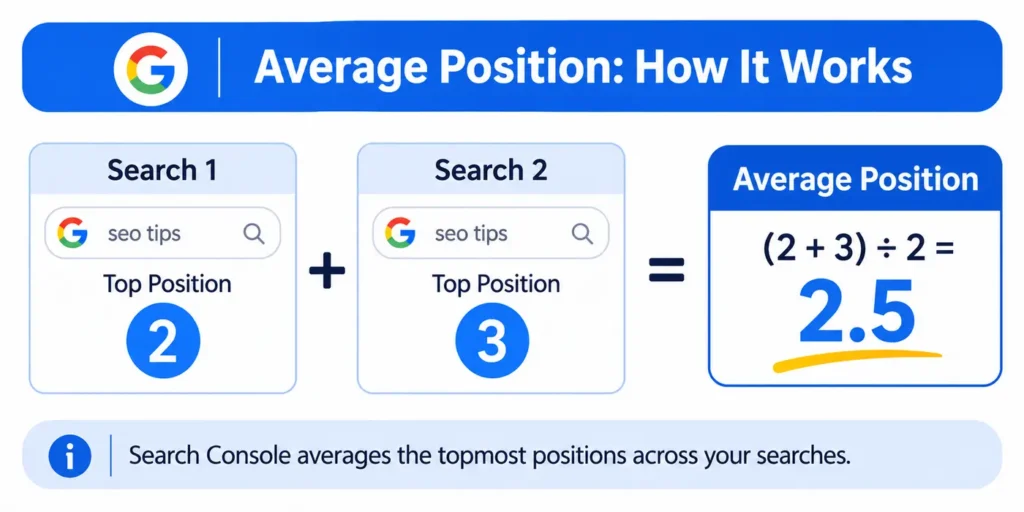
Search Console’s average position is the topmost spot your site held in each search where it appeared, averaged across those searches. Google’s own example: a site that showed at position 2 in one search and position 3 in another averages 2.5. A position counts only when someone actually saw your result.
Here is how those rules play out in practice, based on Google’s help page on impressions, position and clicks:
- It’s an average, not a spot reading. An average of 6 can hide a 3 for some searchers and a 9 for others.
- Lower is better. Position 1 is the topmost spot on the page.
- Only seen results count. If your page sits on page three and nobody scrolls there, Google records no position. You see a dash instead.
- Ads don’t take a position. Google says ads do not occupy a search position, so they never push your number up.
- AI Overviews share one position. An AI Overview occupies a single position, and every link inside it gets that same number.
- AI Mode follows the standard method. A follow-up question in AI Mode counts as a new query.
- Position 11 does not always mean page two. Google lists several things an 11 can mean, including a spot in a side panel.
Google also advises you to watch how position changes over time, especially sudden jumps, instead of fixating on one absolute number. That advice shapes the monthly routine later in this guide.
Why Does Your Ranking Look Different When You Search Yourself?
Search results are specific to the time, place, device and recent history of the person searching. Your own check shows one personalized result, while Search Console averages every real search where your page appeared. Use Search Console for decisions, and use manual searches only to see what the results page looks like.
Google’s help page covers this exact complaint. A site owner sees position 5 in the Performance report, then finds the page at position 8 in a live search. Google’s answer is that the report shows an average across all searches, while your own search reflects your history and location.
Think of your manual check as a single photo. Search Console is the whole album.
Which Keywords Should You Track?
Track 10 to 20 keywords, sorted into three groups: money keywords tied to leads or sales, striking-distance keywords sitting just off page one, and brand terms. A short list keeps your monthly review fast and shows which pages deserve attention first. Exporting every query buries the useful signals in thousands of rows.
Here is how to sort them:
- Money keywords. Terms tied to leads, sales or sign-ups.
- Striking-distance keywords. Queries with solid impressions where your average sits just off page one, roughly positions 8 to 20. Treat that range as a rule of thumb, because Google warns that a position number can mean different things. These pages often respond fastest to a title or content update.
- Brand terms. Check that you own your own name.
Not sure which terms deserve a spot? Our SEO keyword research guide shows how to find them. The wrong keywords tell you nothing useful, so choose before you measure.
How Do You Build a Free Rank Tracking Sheet?
A free rank tracking sheet needs eight columns: month, keyword, ranking page, average position, impressions, clicks, CTR and what changed. Export your priority keywords from the Performance report once a month and paste the rows in. The what-changed column links each ranking move to a specific edit, which shows you what works.
Search Console’s 16-month window is long, but it does not last forever. A spreadsheet keeps your history for as long as you want. Run this routine once a month:
- Set the date range to the last full calendar month.
- Filter to your 10 to 20 priority keywords.
- Click Export to download the chart and table data.
- Paste the rows into a running sheet with these columns:
| Month | Keyword | Ranking page | Avg. position | Impressions | Clicks | CTR | What changed |
|---|---|---|---|---|---|---|---|
| 2026-09 | sample keyword | /sample-page/ | 11.2 | 900 | 18 | 2.0% | Title rewritten Sep 18 |
| 2026-10 | sample keyword | /sample-page/ | 8.7 | 1,050 | 31 | 3.0% | Added FAQ section |
Example rows for illustration only.
The last column matters most. A log of what you changed and when shows you what actually moves rankings on your site. Without it, you have numbers and no explanations.
Prefer charts? Google’s Looker Studio has a Search Console connector, so you can chart positions over time without copying data by hand. Want to see what visitors did after the click? Pair this sheet with GA4. Our guide to conversion tracking in GA4 shows how to measure the actions that follow a ranking win.
Can You Track Bing Rankings for Free?
Yes. Bing Webmaster Tools is free and reports impressions, clicks and average position across your pages and keywords, with up to 16 months of data. It tracks Bing only, but Microsoft says Copilot grounds its web answers in Bing search, so your Bing visibility reaches beyond Bing itself.
Setup mirrors Search Console. Verify your site, then open the Search Performance report and filter by query. Bing’s own announcement lists the report and its 16-month window. Microsoft’s documentation explains that Copilot sends generated search queries to the Bing search service to ground responses in web data.
Which Free Method Should You Use?
| Method | Best for | Main limit |
|---|---|---|
| Google Search Console | Accurate Google positions, clicks and impressions | Only shows searches you already appear for. No competitor data |
| Bing Webmaster Tools | Bing positions and keywords | Covers Bing only |
| Monthly spreadsheet | History beyond 16 months, plus notes on changes | Manual. Takes about 15 minutes a month |
| Looker Studio dashboard | Visual charts for reports | Takes an hour or two to set up |
| Free one-time rank checkers (Ahrefs and Semrush both run one) | A quick spot check from one location | One snapshot, and free limits change often |
| Manual Google searches | Seeing what the results page looks like | Personalized, so not a reliable position |
How Do You Turn Rank Data Into Action?
Review your rank data once a month and act on four patterns: keywords that climbed, keywords that dropped, high impressions with low clicks, and keywords just off page one. Each pattern points to a different fix, from repeating a win to rewriting a title. Skip daily checks, because positions move naturally and trigger rushed edits.
Here is how to read each pattern:
- A keyword climbed. Check your notes column. Keep what worked and repeat it on similar pages.
- A keyword dropped. Open the Pages tab first. A different page may now rank for the query, which splits your signals. Then compare your page with what ranks today. Our guide to optimizing a blog post after publishing walks through a refresh.
- Impressions are high but clicks are low. The ranking works, but the listing does not earn the click. Rewrite the title with help from our title tag optimization guide.
- A keyword sits just off page one. These make the best refresh targets, because a small gain can move them onto page one.
Skip daily checks. Rankings wobble from day to day, and reacting to each wobble leads to rushed edits.
When Is a Paid Rank Tracker Worth It?
A paid rank tracker is worth it when you need data Search Console cannot give: keywords you do not rank for yet, competitor positions, daily or local tracking, or hundreds of keywords across several sites. For most small sites, free tracking covers the job. Check current free-plan limits first, because they change often.
Here is what each need looks like:
- Keywords you don’t rank for yet. Search Console only shows searches where you already appear.
- Competitor positions. Free reports show your own site only.
- Daily or local tracking, such as map-pack positions across different neighborhoods.
- Hundreds of keywords across several sites or clients.
Many paid tools offer free plans or trials, but limits change often. Check current terms before you build a workflow around one.
Frequently Asked Questions
Is Google Search Console accurate for rankings?
It is the most accurate free source, because it uses data from real Google searches. The number is an average, though, not a fixed spot. Google records a position only when someone actually sees your result, so the figure reflects real impressions across many people. Use it to track trends, not to chase a single decimal.
Why is my ranking different when I Google it myself?
Google tailors results to the time, location, device and recent search history of each person. Your own search shows one personalized result. Search Console’s average position covers every real search where your page appeared, so it gives you the better number for decisions. Treat manual searches as a quick look at the results page.
Can I track keywords I don’t rank for yet for free?
Not directly. Search Console only reports searches where your site already appeared. A useful free signal sits in the Queries report: when a target keyword first shows up there, Google has started showing your page for it. For keywords with no impressions yet, run occasional manual searches or use a paid tracker.
How often should I check my rankings?
Monthly works for most small sites. Daily positions move up and down naturally, and reacting to every change leads to rushed edits. Compare one month with the last, or with the same month last year, and read your notes column to see what you changed in between.
Does Search Console show competitor rankings?
No. It only shows data for properties you have verified as your own. To see how competitors rank, search manually and note who appears, keeping personalization in mind. A paid tool that tracks several domains for the same keywords gives you a cleaner comparison.
Can I track Bing rankings for free?
Yes. Bing Webmaster Tools is free and reports impressions, clicks and average position, with up to 16 months of data. Microsoft’s documentation says Copilot sends generated search queries to Bing to ground its answers in web data, so Bing visibility also matters for Copilot.
Start Tracking This Week
You do not need a subscription to know where you rank. Open the Performance report, switch on Average position, and export your first month. Log it in a sheet, add a note each time you change a page, and repeat next month. Within a quarter you will have a clear record of what works on your site.
Want a second pair of eyes on your Search Console data? Contact the Rankiwis team and we will walk through it with you.