Most link building is a favor you ask of someone else. A guest post needs an editor to say yes. A backlink needs another site to choose you. Internal links work differently. You own every page, you decide every link, and nobody can say no.
That control makes an internal linking strategy one of the highest-return SEO jobs on any site. This guide covers what Google actually says about internal links, which popular claims are myth, and a four-step process to get your important pages found, understood and prioritized.
Table of Contents
What Is an Internal Linking Strategy?
An internal linking strategy is a planned way of linking your own pages together so visitors and Google can find, understand and prioritize them. It decides which pages get links, from where, and with what anchor text, so your most important pages are never more than a few clicks away.
Internal links connect pages on the same website: menus, footer links, breadcrumbs, and the links inside your content. Contextual links in the body do the most strategic work, because you choose exactly where they go and what they say. Navigation links matter too, but every page carries the same ones, so they say little about which page matters most.
Why Do Internal Links Matter for SEO?
Google uses links to find new pages and as a signal of what pages are about. Its own guidance says every page you care about should have a link from at least one other page on your site, in a crawlable HTML link with descriptive anchor text. Internal links are the only links you fully control.
That gives internal links three jobs:
- Discovery. A page with no internal links (an “orphan page”) is hard for Google to find and easy for visitors to miss.
- Context. The anchor text and the sentence around it tell Google what the linked page covers.
- Priority. The pages you link to most often, from your strongest pages, are the ones you signal matter most.
Picture a plumbing company with a popular guide on water heater repair. One sentence in that guide that links to its tankless water heater installation page sends readers, and Google, straight to a page that makes money. No outreach. No waiting.
Do Internal Links Pass Authority?
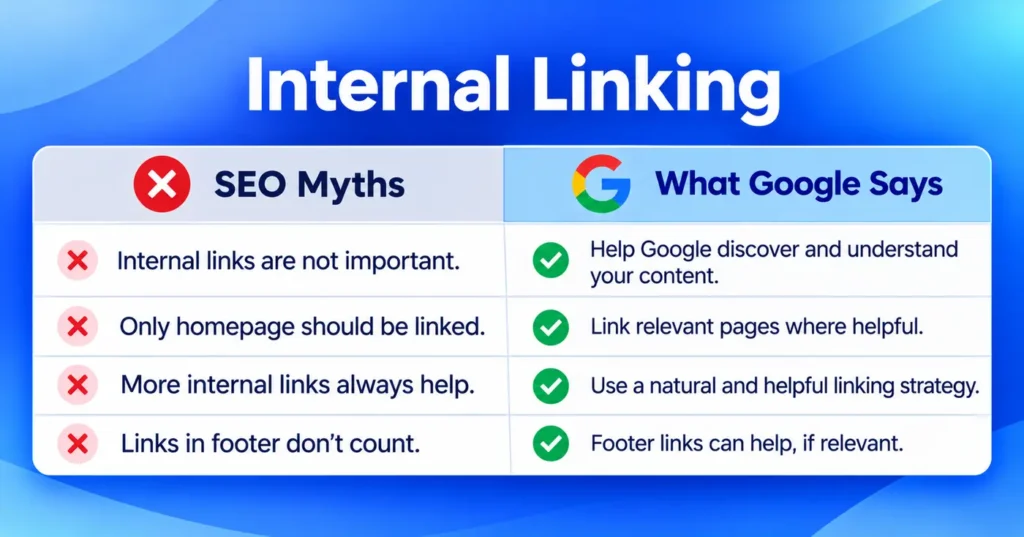
Google confirms it uses links as a signal for relevance and discovery, but it doesn’t publish how much value each internal link passes or how that value splits across a page. Treat exact “link juice” math as folklore. The practical rule holds either way: link to important pages from relevant, well-visited pages, in context, with clear anchor text.
Google’s link best practices confirm links are a signal. Many guides still state the mechanics as fact. Here’s how the common claims stack up.
| Claim | Status |
|---|---|
| Google uses links to find pages and judge relevance | Google-documented |
| Every page you care about should have at least one internal link | Google-documented |
| Descriptive anchor text helps Google understand the target page | Google-documented |
| A set number of links per page helps rankings | Not in Google’s current documentation; Google sets no number |
| Links in main content count more than footer links | Rule of thumb, widely held, not published by Google |
| Internal links that pass through redirects waste value | Rule of thumb; linking to the final URL is simply cleaner |
| “Link juice” dilutes with every extra link | Folklore based on old PageRank models; not current Google documentation |
| Nofollow on internal links “sculpts” authority to key pages | Outdated; Google’s Matt Cutts confirmed the change in June 2009 |
You don’t need the exact formula to do this well. You need the right pages linked from the right places.
How Do You Build an Internal Linking Strategy?
Build an internal linking strategy in four steps. Pick the 5 to 15 pages that drive leads or revenue, group your content into hub-and-spoke topic clusters, find orphan pages and broken or missing links, then add contextual links from your strongest pages. Repeat the review every quarter and every time you publish.
Step 1: Pick your priority pages
List the 5 to 15 pages that earn you money or leads: core service pages, top products, key guides. Every other part of the site should help these pages.
Step 2: Group pages into topic clusters
Arrange content as hubs and spokes. A hub is a broad page, such as “SEO services”. Spokes are the detailed pages around it, such as guides on header tags, link building and site speed.
Link every spoke up to its hub, link the hub down to each spoke, and link spokes to each other where it actually helps the reader. Readers can move through the topic in any direction, and Google sees how the pages relate.
Step 3: Find and fix the gaps
Look for three problems:
- Orphan pages: pages with no internal links pointing to them. Give each one a link from at least one relevant page, as Google recommends.
- Underlinked priority pages: money pages with only a menu link. Add contextual links from related articles.
- Broken internal links: links to pages that no longer exist. Point them to the right live page.
The Links report in Google Search Console shows your most internally linked pages, so underlinked priority pages stand out fast. To find orphans, compare the URLs in your XML sitemap with the pages a crawler reaches by following links. Any sitemap URL the crawler never reached has no internal path to it. Screaming Frog’s free version crawls up to 500 URLs, so it suits smaller sites, and it also flags broken internal links.
Step 4: Add links in context
Go to your strongest, most-visited pages and add links where they help the reader. Write each link as part of a sentence, not a “related posts” dump at the bottom.
Want a second pair of eyes on your site structure? The Rankiwis team maps and fixes internal linking for small businesses. Contact Rankiwis team for a quick review.
What Does a Hub-and-Spoke Cluster Look Like?
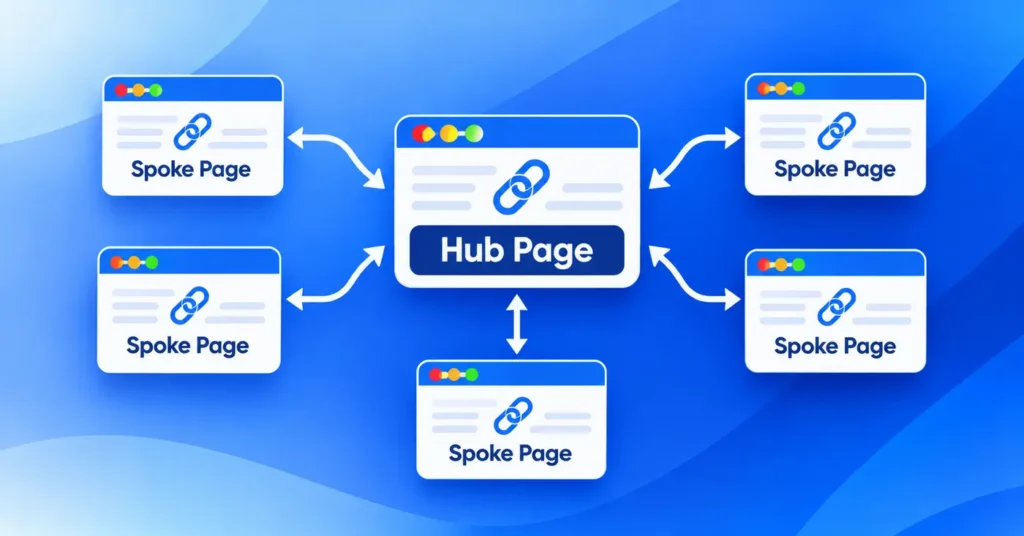
A hub-and-spoke cluster is one broad hub page linked to several narrower spoke pages on the same topic, with every spoke linking back up to the hub. Spokes also link to each other where a reader would naturally want the next step. The structure shows Google how the pages relate and which page leads the topic.
Here’s how we link our own on-page SEO cluster at Rankiwis:
| Page | Role | Links to |
|---|---|---|
| What Is On-Page SEO? | Hub | Every spoke below |
| Title tag optimization | Spoke | Hub, header tags |
| Header tags (H1, H2, H3) | Spoke | Hub, title tags, SEO blog posts |
| Image SEO | Spoke | Hub, title tags, header tags |
| How to write SEO-friendly blog posts | Spoke | Hub, header tags, E-E-A-T |
A reader who lands on the image SEO guide can reach the hub in one click and the title tag guide in one more. Google gets the same short paths.
How Do You Write Good Internal Link Anchor Text?
Google describes good anchor text as “descriptive, reasonably concise, and relevant” to both the page it sits on and the page it links to. Read the anchor on its own. A reader should know what the next page covers. Skip “click here”, vary the wording naturally, and never stuff keywords into anchors.
| Weak | Better |
|---|---|
| Click here | our guide to local SEO for plumbers |
| Read more | how to set up conversion tracking in GA4 |
| SEO, cheap SEO, best SEO services | our SEO services |
Google lists keyword stuffing as a spam policy violation, and stuffed anchors read badly anyway. The same exact-match anchor on every page that links to a service page looks manufactured too, so let the wording change with the sentence. Also avoid chaining several links side by side. Google advises spacing them out with surrounding context so readers can tell them apart.
How Do You Make Sure Google Can Follow Your Links?
Google can generally only crawl a link that’s a standard <a> HTML element with an href attribute. Google can’t reliably follow links built from JavaScript click events alone, or <a> tags without an href. Image links need descriptive alt text, because Google uses the alt text as the anchor text.
Two quick checks:
- Image links need alt text. An image link with empty alt text gives Google no anchor text at all.
- JavaScript-inserted links need checking. Run the URL Inspection tool in Search Console to confirm the link appears in the rendered HTML.
Should Internal Links Be Nofollow?
Almost never. Google says to use nofollow only when you don’t trust the source. You trust your own pages, so nofollow on internal links just stops Google using those links normally. The old trick of nofollowing links to “sculpt” authority stopped working years ago, as our guide to dofollow vs nofollow links explains.
Want a page kept out of search results? Use a noindex tag on that page. A nofollow link doesn’t remove a page from Google.
How Many Internal Links Should a Page Have?
There’s no set number. Google’s link guidance doesn’t name one. It asks for descriptive anchor text, links in context, and no chains of links bunched side by side.
A useful rule of thumb for blog posts is a handful of contextual links a reader would actually click, not dozens. If a paragraph starts to feel like a list of links, it has too many. Navigation menus, footers and breadcrumbs don’t count against that.
What Internal Linking Mistakes Should You Avoid?
The most common internal linking mistakes are new posts published with no links pointing to them, links that run through redirects, the same exact-match anchor on every page, and a “related posts” widget doing all the work. Each one is quick to fix once you know to look for it.
- Orphaned new posts. Every new post should receive a link from one or two older, related pages on the day it goes live.
- Links through redirects. After a URL change, update internal links to point straight at the final URL.
- Identical anchors everywhere. Vary the wording with the sentence.
- Widgets instead of context. Automated “related posts” blocks help a little. A sentence-level link helps more.
- Links buried in a block. Ten links in one paragraph give each one less context. Spread them out.
- Forgotten old content. Your oldest posts often hold the most authority. Revisit them and link to newer pages.
Frequently Asked Questions
How many internal links should a page have?
Google doesn’t set a number. Its guidance focuses on descriptive anchor text and links placed in context. For most articles, a handful of contextual links a reader would actually click works well. Menus, footers and breadcrumbs are separate and don’t need counting against that.
Do internal links pass authority?
Google confirms it uses links as a signal for relevance and to discover pages. It doesn’t publish how much value each link passes or how it’s divided. The practical approach is the same either way: link to important pages from relevant, well-visited pages with clear anchor text.
Should internal links be nofollow?
No. Google recommends nofollow only for links to sources you don’t trust, and you trust your own pages by definition. Nofollow on internal links just stops Google using them normally. To keep a page out of search results, use a noindex tag on that page instead.
What is an orphan page?
An orphan page is a page on your site that no other page links to. Visitors can’t navigate to it and Google may struggle to find it. Google’s guidance is that every page you care about should have a link from at least one other page on your site.
Does internal link anchor text matter?
Yes. Google uses anchor text to understand what the linked page is about, and recommends text that is descriptive, concise and relevant. Avoid vague anchors like “click here” and avoid stuffing keywords, which Google treats as a spam policy violation. Natural, specific anchors work best.
How often should I review internal links?
Quarterly suits most small businesses, plus every time you publish. Each new post should link to at least one related page and receive a link from one or two older ones. A quarterly check catches orphan pages, broken links and priority pages that aren’t getting enough support.
Want your strongest pages working harder for your money pages? Rankiwis helps small businesses plan site structure and internal links that support rankings. Contact Rankiwis team to talk it through.