Google reviews aren’t just nice social proof. They’re one of the most influential ranking factors in local search. Yet most small business owners still treat reviews as something that happens passively, if it happens at all.
The truth is simpler: consistent, quality reviews are within your control. You can build a system that generates them steadily, strengthens your local authority, and directly improves where you appear in Google Maps and local search results.
This guide shows you exactly how. You’ll learn why reviews matter beyond reputation, the four-phase strategy to build a sustainable review engine, and the specific tactics that actually convert satisfied customers into reviewers.
Google reviews are search rankings factors. According to Whitespark’s Local Search Ranking Report, review volume, recency, and quality account for approximately 15–17% of local pack rankings. Businesses that generate consistent, detailed reviews from real customers rank higher in local search and Google Maps. The key is building a systematic process: set up your Google Business Profile, make it easy for customers to leave reviews, respond to all feedback, and monitor your review performance over time.
Table of Contents
Why Google Reviews Matter: Ranking, Trust, and Revenue
You’ve heard that reviews drive trust. That part is true — according to Tulip Tree Marketing, 84% of people trust online reviews as much as personal recommendations. But what many business owners don’t realize is that reviews are also a ranking signal.
Google has confirmed this directly. In their own support documentation on improving local rankings, Google states that “review count and score are factored into local search ranking. More reviews and positive ratings will probably improve a business’s local ranking.” This isn’t optional. It’s baked into the algorithm.
Here’s what happens when you invest in reviews:
Higher visibility in search results. When a potential customer searches “plumber near me” or “best dentist in Austin,” Google evaluates your relevance, distance, and prominence. Prominence is measured partly by your review volume and ratings. More reviews signal that you’re a known, trusted business in your area. Google rewards those signals by pushing you higher in results.
More clicks from searchers. Research from Visual Realm shows that a business with a 5-star rating gets approximately 39% more clicks than a 1-star business in local results. Even if you’re ranked second or third, a strong rating makes you visually competitive and more likely to earn the click.
Better performance in the local pack. The “Local 3-Pack” — those three map results that appear at the very top of Google search — is where local business visibility matters most. Rank here, and you’ve won the visibility game for that search. Reviews are a primary factor in who appears there.
Engagement that Google sees as activity. When you respond to reviews, you’re adding fresh content to your profile. Google’s algorithm picks up on that engagement. It signals that your business is active, responsive, and genuinely invested in customer satisfaction — all signals of a legitimate, healthy business.
Businesses with higher review counts and better star ratings rank higher in Google’s local pack, Maps results, and local search pages. Review signals contribute to about 15–17% of local ranking factors (Whitespark). Higher ratings also increase click-through rates; a 5-star business gets roughly 39% more clicks than a 1-star business in local results. Review velocity (how often you receive new reviews) also matters — Google prioritizes fresh review activity as a signal of ongoing relevance.
The Four-Phase Review Strategy
Getting more reviews isn’t about asking harder or more often. It’s about building a process that makes leaving a review feel natural and effortless for your customers. Here’s the framework that works:
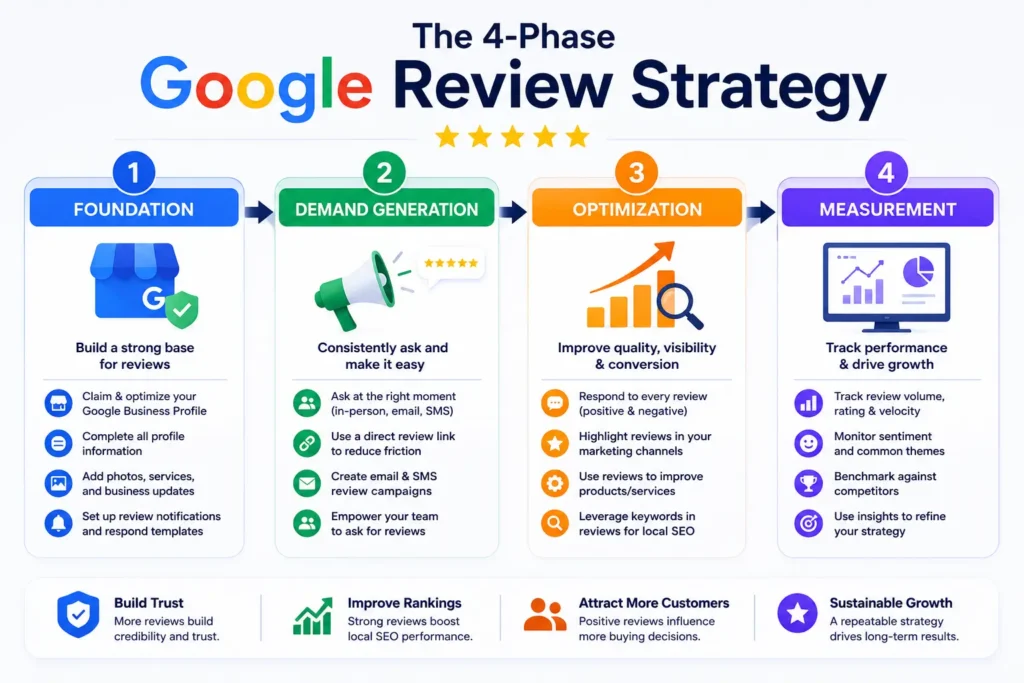
Phase 1: Foundation — Set Up and Verify Your Google Business Profile
You cannot collect reviews without a claimed, verified Google Business Profile. This is step zero.
If you haven’t already, go to Google Business Profile and search for your business. If it exists, claim it. If it doesn’t, create it.
Next, verify your profile. Google offers four verification methods: phone (fastest option, takes a few minutes), email (usually takes 3–5 days), video (for certain business types), or in-person (if phone or email don’t work).
Once verified, complete your profile fully with best practices for Google Business Profile optimization:
- Business name, address, phone number (NAP) exactly as it appears elsewhere online
- Business hours (including special hours for holidays)
- Category (pick the most specific one available)
- Business description (100–160 characters)
- Photos (at least 10: exterior, interior, team, products/services, happy customers)
- Services or products offered
- Booking or appointment links (if applicable)
This foundation is critical. An incomplete profile signals to customers and to Google that your business isn’t well-maintained. A complete, polished profile makes leaving a review feel safer and more trustworthy.
To set up a review-generating system, first claim and verify your Google Business Profile at google.com/business. Verify using phone, email, video, or in-person methods. Then complete your profile fully with accurate NAP (name, address, phone), hours, category, description, and at least 10 photos. A complete profile increases customer trust and signals legitimacy to Google, making review requests more effective.
Phase 2: Demand Generation — Ask Customers for Reviews (The Right Way)
The most important statistic you need to know: according to Qdos, 77% of customers will leave a review if asked. Most simply never see the request because you haven’t asked.
But there are right ways and wrong ways to ask. Google’s policies are strict: you cannot offer incentives (discounts, free items, etc.) in exchange for reviews. You can ask directly and make the process easy.
Here are the most effective channels:
1. Create and Share Your Review Link
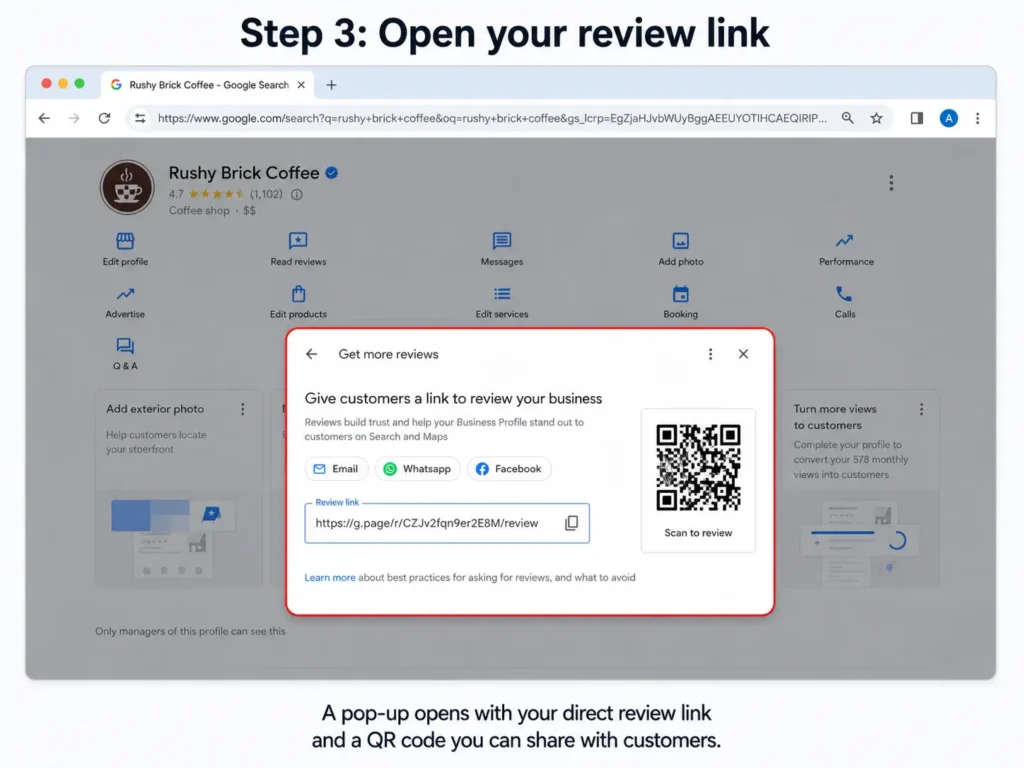
Log into your Google Business Profile. Click the button that says “Read Reviews.” Then click “Get More Reviews.” Google will generate a unique URL for your business. Copy this link. This is your review shortcut — it skips the “search for us on Google Maps” step entirely.
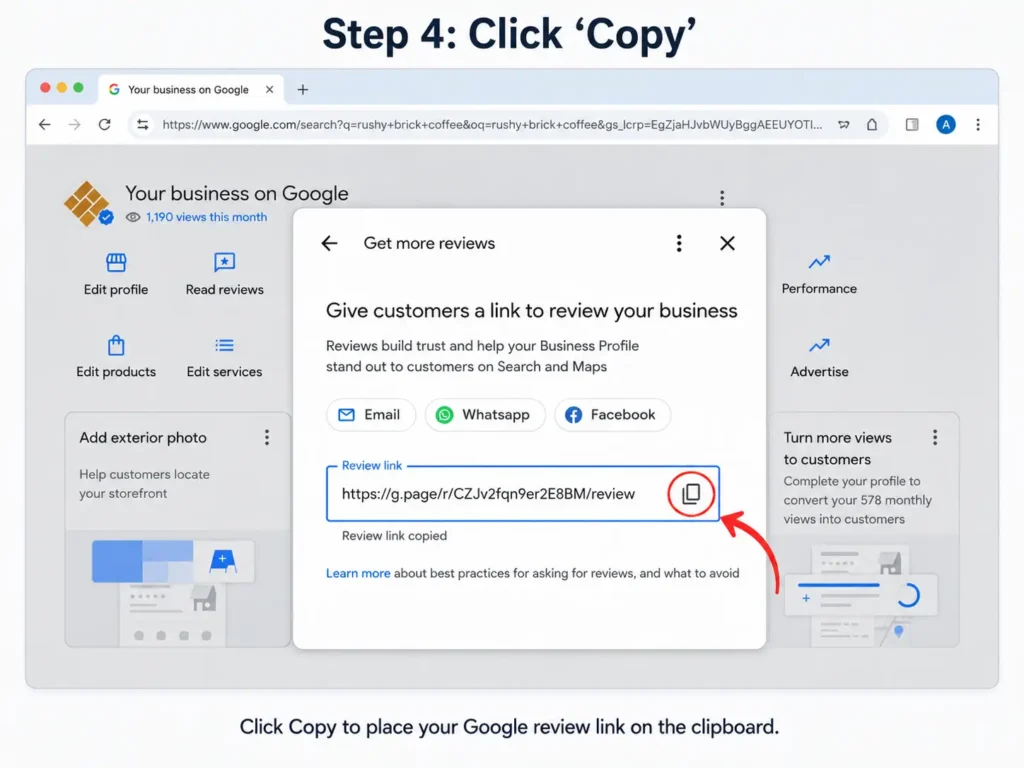
Share this link everywhere:
- In email signatures
- In follow-up emails after purchase or service completion
- On business cards (with a direct call-to-action)
- In SMS text messages
- Printed on receipts or invoices
- In your booking or appointment confirmation emails
Example email template (after a successful service):
“Thank you for choosing us! We’d love to hear about your experience. If you had a great time, would you mind leaving us a quick review? It takes about a minute, and it really helps us grow. [Insert review link here]”
2. Ask In Person (Strongest Tactic)
If you have a physical location or meet customers face-to-face, ask directly in the moment when they’re happy.
Timing matters. Ask right after you’ve delivered good service — not before payment, not days later. The best moment is when you’re saying goodbye or they’re expressing satisfaction.
Training your team to do this consistently is powerful. If you have five staff members and each asks three customers per day, that’s 15 requests daily. Over a week, that’s over 100 potential reviews.
3. Email Campaigns (Scalable and Trackable)
For service-based businesses, follow-up emails work well. The best time to send a review request email is right after the customer has finished the service and is satisfied.
Send the email from a real person (not “noreply@company.com”). Include your review link. Keep the subject line clear: “We’d Love Your Feedback” or “How’d We Do?”
Example:
Subject: How’d we do?
Body: “Hi [Customer Name], Thanks for working with us on [specific project/service]. We really appreciated your business. If you had a good experience, we’d be grateful if you’d share that on Google. It helps us, and it helps other people who are looking for someone they can trust. Takes about a minute. [Review link] — Thanks, [Your name]“
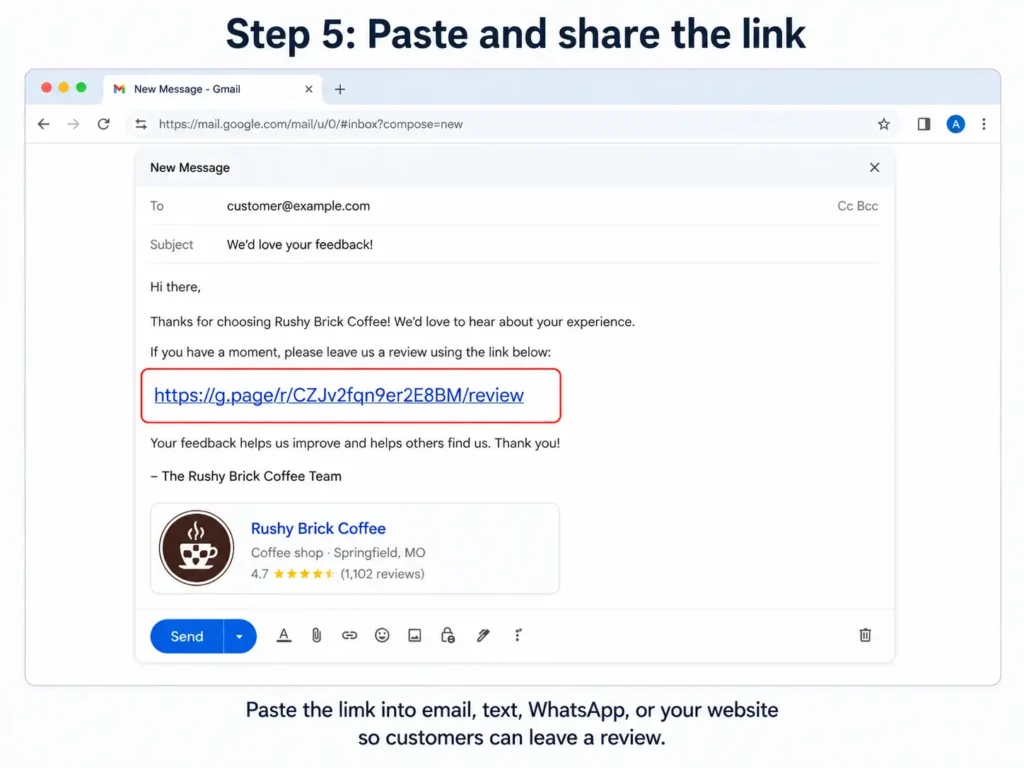
According to Setmore, email has a 69% open rate for review requests, making email one of the highest-volume channels.
4. SMS/Text Messages (Highest Response Rate)
If you have customers’ phone numbers (from bookings, past purchases, etc.), text is effective. Text open rates are 98%, far higher than email.
Keep it brief: “Hi [Name]! Quick question — would you mind leaving us a review on Google? It helps us a lot and takes 60 seconds. [Review link]“
5. QR Codes (Frictionless)
Print QR codes on business cards, posters in-store, receipts, and invoices. They remove the friction of typing or searching. One scan and the customer is on your review page.
To ask customers for reviews, create a direct review link through Google Business Profile. Share this link via email (after service), SMS (for mobile-first customers), in-person (with a QR code), or on receipts and business cards. In-person requests are most effective; 77% of customers will leave a review if directly asked. Email has a 69% open rate. Train your team to ask consistently right after delivering good service.
Phase 3: Optimization — Respond to Reviews and Build Momentum
Getting reviews is half the job. Responding to them is where most businesses fail — and where Google rewards engagement.
The stats are telling: according to Verse.ai, 53% of customers expect a business to respond to their review within a week. Yet 75% of businesses never respond at all. By simply responding to reviews, you’re already outperforming the majority of your competitors.
Respond to Positive Reviews
Don’t send a robotic “Thanks for the 5 stars!” to everyone. Instead, acknowledge something specific from their review.
If they mention your “friendly staff,” write: “Thank you so much for mentioning our team. They work hard to make sure every customer feels welcomed, and we’re glad they succeeded with you.”
This approach:
- Shows you’re actually reading and valuing their feedback
- Reinforces positive experiences in the mind of future readers
- Adds fresh content to your profile (Google sees this activity)
- Increases the likelihood they’ll return
Respond within 1–3 days of the review being posted.
Respond to Negative Reviews
Negative reviews can hurt, but your response is visible to everyone. A thoughtful, professional reply can actually build trust with future customers by showing you care about fixing problems.
Do this:
- Don’t get defensive.
- Apologize for the bad experience (regardless of whether you think it’s fair).
- Take responsibility.
- Offer to make it right (offline, not in the review section).
- Keep it brief.
Example: “We’re sorry you had this experience. That’s not the standard we hold ourselves to. Please reach out to us directly at [phone/email] so we can make this right.”
This tells future customers that you take feedback seriously and you fix problems. That’s powerful trust-building.
Respond to Longer, Detailed Reviews
Reviews with specific details about services, staff, or experiences carry more weight in Google’s algorithm than one-sentence reviews. When you get a longer review, spend extra effort on your response.
If someone writes: “John was incredibly knowledgeable and walked me through every step of the process. I felt heard and informed,” don’t just say thank you. Say: “Thank you for specifically mentioning John — he takes immense pride in making sure customers understand their options. We appreciate you choosing to work with us.”
This reinforces positive service details that future customers will read.
Respond to all reviews within a week of posting. For positive reviews, acknowledge specific details they mention rather than sending generic thanks. For negative reviews, apologize sincerely, avoid defensiveness, take responsibility, and offer to fix the problem offline. For detailed reviews, expand your response to reinforce the specific service details they praise. Businesses that respond to reviews consistently see higher ratings overall. Response activity also signals to Google that your profile is actively maintained.
Phase 4: Measurement and Momentum — Track, Analyze, Refine
You can’t improve what you don’t measure. Set up a simple tracking system.
Every month, note:
- Number of new reviews
- Average rating
- Review sentiment (are they mostly positive, mixed, or negative?)
- Response rate (what percentage of your reviews have you responded to?)
- Review velocity (are you getting reviews more frequently or less?)
If you’re getting zero reviews a month, something in Phases 1–3 isn’t working. Common issues: your profile is incomplete or doesn’t look trustworthy, you’re not asking customers consistently, you’re asking at the wrong time, or your review link isn’t visible enough.
If you’re getting 3–5 reviews per month, that’s solid. If you’re consistently getting 8+, you’re winning.
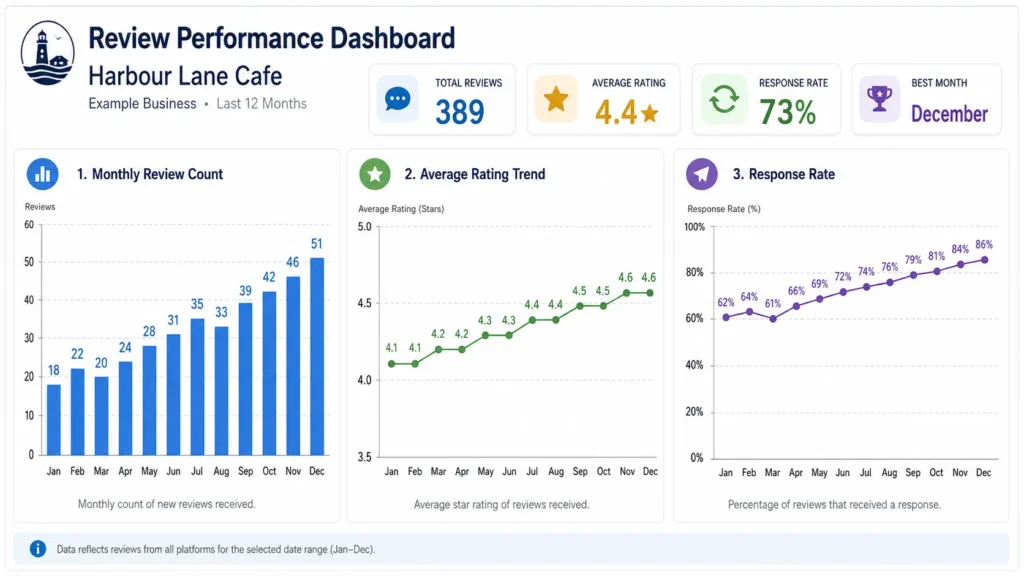
Google also rewards consistency over time. Getting one month of 20 reviews and then silence is less valuable than getting 5 reviews per month for 12 months straight. Build a steady cadence, not bursts.
Common Mistakes That Kill Your Review Authority
Even with the best intentions, these mistakes undermine your review strategy:
Asking for positive reviews only. Don’t make it obvious that you only want 5-star reviews. This smells inauthentic to Google and customers alike. If you ask broadly for feedback, you’ll get a mix — and that mix is actually more trustworthy.
Offering incentives. Offering a discount, free item, or contest entry for a review violates Google’s policies. Google filters out reviews obtained this way and can eventually remove your entire profile. It’s not worth it.
Not responding consistently. If you respond to some reviews and ignore others, you’re signaling inconsistency. Respond to all, or nearly all.
Asking too soon or too late. Ask right after they’ve had a positive experience. If you wait two weeks, the emotional high has faded. If you ask before they’ve experienced your full service, it feels pushy.
Stuffing your profile with photos of the same thing. Upload diverse images — your space, team, customers, products/services, happy moments. Variety signals authenticity.
Ignoring the negative reviews. The worst thing you can do is let a bad review sit with no response. Respond thoughtfully every time.
How to Handle Missing or Filtered Reviews
Google’s algorithm sometimes filters out reviews, or they disappear altogether. This can happen for legitimate reasons (reviews from new or suspicious accounts) or bugs.
If you notice reviews missing:
- Check your Google Business Profile review count. If it’s lower than before, something changed.
- Check Google’s support article on filtered reviews (support.google.com/business/answer/9704597).
- If you think a review was removed unfairly, contact Google Business Profile support and provide specifics.
- If a review violates Google’s policies (fake, abusive, promotional), you can flag it for removal using your profile’s moderation tools.
In February 2025, a widespread bug caused thousands of legitimate reviews to disappear temporarily. Google fixed it, but the incident shows why you shouldn’t rely solely on reviews. Pair your review strategy with other local SEO efforts: citations, quality on-page content, and backlinks.
Integrating Reviews Into Your Broader Local SEO Strategy
Reviews are powerful, but they’re one piece of the local SEO puzzle. For maximum impact, pair your review strategy with a comprehensive local SEO approach that includes citations, quality content, and technical foundations.
Display reviews on your website. Feature positive reviews and high-star ratings on your homepage, service pages, and landing pages. This builds trust and provides on-page SEO signals (fresh user-generated content).
Use review themes in your content. If multiple customers mention “fast turnaround” or “expert knowledge,” build blog content or service pages around those themes. You’re echoing what customers actually say, which helps with topical relevance.
Embed reviews in email campaigns. Include a customer testimonial or star rating in follow-up emails. It increases click-through rates and conversions.
Create location-specific content. If customers mention specific neighborhoods or areas in their reviews (“Great service in downtown Denver”), create location pages that target those areas with locally relevant content.
Include review schema markup on your site. Use the Review or AggregateRating schema so Google can read and display your ratings directly in search results. This improves click-through rates. Learn how to structure your content for AI engines to maximize visibility in both traditional and generative search results.
Why This Matters More Than Ever in 2026 and Beyond
Google’s AI-powered search features are changing how reviews influence visibility. With AI Overviews and generative search results, Google is pulling information directly from reviews to answer user queries. A review mentioning “fast shipping” or “excellent customer service” can now appear in AI-generated answers, extending your visibility beyond traditional search.
Businesses with consistent, detailed reviews are outperforming those without. The more authentic feedback you collect, the better Google understands your business — and the more prominently you’ll appear in both traditional and AI-powered search results.
Build a sustainable Google review strategy by following four phases: (1) Set up and verify your Google Business Profile completely. (2) Ask customers for reviews via email, SMS, in-person, QR codes, and your direct review link right after good service. (3) Respond to all reviews within a week — personalize responses to positive feedback and take responsibility for negative feedback. (4) Track monthly review count, rating, and velocity to identify what’s working. Focus on consistency over time. Responding to reviews signals activity to Google and builds customer trust. Businesses that do this rank higher in local pack, Maps, and AI-powered search results.
FAQs
How many reviews do I need to rank?
A: There’s no magic number, but more is better. You should aim to accumulate reviews consistently. In competitive local markets, businesses with 50+ reviews typically perform better than those with 10. However, a business with 5 highly detailed, positive reviews can outrank one with 20 generic ones. Focus on quality and consistency.
Can I buy Google reviews?
No, and it will damage your business. Google filters out fake reviews and can suspend your entire profile if you violate their policies. The risk far outweighs any short-term benefit.
How long does it take to see ranking improvements from reviews?
You may see changes within a few weeks if you’re consistently getting new reviews. However, Google’s algorithm processes local signals over time. If you commit to a steady review pipeline for 3–6 months, you should see measurable improvements in local visibility.
What if I get a fake or abusive review?
Flag it in your Google Business Profile moderation tools. Google will review it and remove it if it violates policies. Don’t respond publicly to abusive reviews — just report them.
Should I respond to every review?
Yes, when possible. If you have hundreds of reviews, responding to all may not be realistic. But aim to respond to at least 80–90% of reviews, prioritizing recent ones and those that require a response (complaints, detailed praise, questions).