Most SEO metrics dashboards bury the one number that matters under forty that don’t. Rankings climb, impressions spike, domain authority ticks up, and the sales team still says the phone is quiet.
This guide sorts the SEO metrics worth your time from the ones that waste it. You get four metrics to check every month, three diagnostics to open only when something breaks, and a short list of numbers you can stop reporting today. The rule behind the sorting is simple. A metric earns its spot only when it ties to leads or revenue and tells you what to do next.
Table of Contents
What Makes a Metric Worth Tracking?
An SEO metric is worth tracking when it passes three tests: it connects to leads or revenue, it points to a specific action, and it moves slowly enough to read monthly but fast enough to show progress within a quarter. Metrics that fail those tests make reports longer without making decisions better.
The best SEO metrics to track pass all three tests. Here is what each one looks like in practice.
It connects to leads or revenue. Traffic is a means, not a goal. You can rank first for a keyword that never produces a single sale, and a report that celebrates that ranking hides the problem.
It points to an action. A number you can’t act on is trivia. Click-through rate on a page that ranks fifth tells you to rewrite the title. Domain authority tells you nothing you can fix this week.
It moves at a readable speed. SEO results take months to build, so daily numbers mislead. Monthly numbers, compared with the same month last year, show the real trend.
Semrush’s SEO KPI guide makes a similar case. It argues for a few hand-picked KPIs tied to one goal instead of a dozen scattered ones, and it pairs one lagging indicator (the result) with two leading indicators (the early signals). The rest of this guide follows that approach.
What Are the SEO Metrics That Matter Most?
The SEO metrics that matter most are organic conversions, non-branded clicks, click-through rate on key pages, and referring domains. Check them monthly. Add indexing health, Core Web Vitals, and engagement rate as diagnostics when results drop. Everything else is context, not a target.
Together, the four core metrics show whether search brings in people who convert, people who don’t know you yet, and people who click when they see you. Start here.
1. Organic conversions
Organic conversions count the key events that start from organic search. Key event is GA4’s name for a conversion. It might be a form fill, a booked call, a purchase, or a newsletter signup.
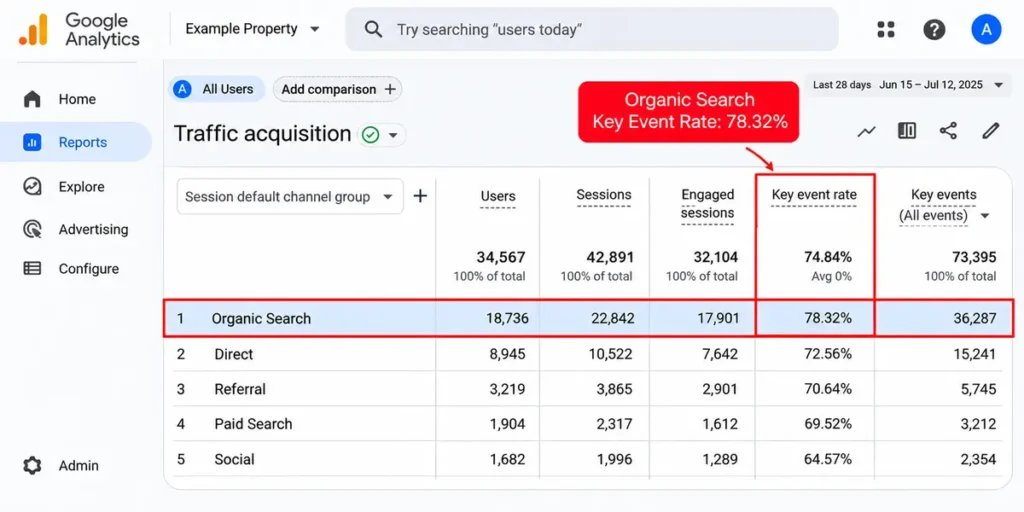
Find it in GA4 under Reports, Acquisition, then Traffic acquisition. Look at the Organic Search row and read its key event count and key event rate. The column may sit empty at first. Set up your key events before anything else, and use our GA4 conversion tracking guide to do it step by step. The GA4 beginner’s setup guide covers the basics behind it.
This metric comes first because it is the only one on the list that speaks the language of the business. A rise here means SEO pays for itself. A flat line here, with traffic still rising, means you rank for the wrong searches.
2. Non-branded organic clicks
Branded clicks come from people who already know your name. Non-branded clicks come from strangers who typed a problem into Google and picked you. SEO exists to win that second group.
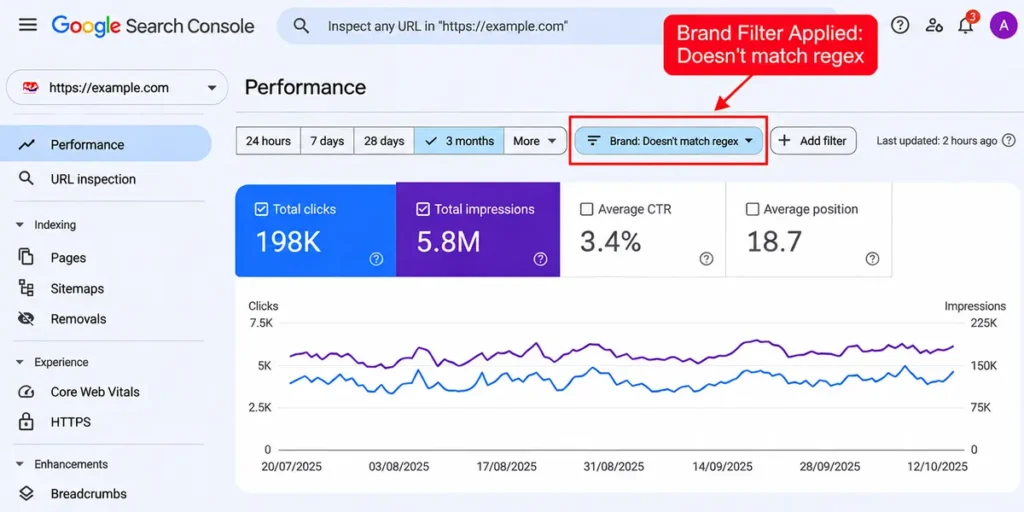
Open Google Search Console, go to Performance, then Search results. Add a Query filter, choose “Doesn’t match regex,” and enter your brand name plus common misspellings, separated by a pipe symbol. The clicks you see now are your non-branded clicks. Our Search Console guide shows where each report lives.
Watch this number month over month and year over year. Steady growth means your content reaches new buyers.
3. Click-through rate on your key pages
Impressions mean little. Clicks mean a lot. Click-through rate (CTR) shows how often people who see your listing choose it.
In Search Console, open the Pages tab under Performance and sort by impressions. Spot the pages that rank in the top ten but earn a low CTR. Those pages already won the hard part. A better title tag or meta description can win more clicks without a single new backlink. Our guide to title tag optimization shows how to rewrite them.
Skip universal CTR benchmarks. CTR swings with your position and with what else shares the results page, such as ads, featured snippets, and AI answers. Compare each page with its own past instead.
4. Referring domains
A referring domain is a unique website that links to you. Ten links from one site tell you less than ten links from ten different sites, so count domains, not total backlinks.
Pull the number from your backlink tool each month and act on it each quarter. Growth here usually follows good content and real outreach, and it moves slowly. Our explainer on what a backlink is and why it matters covers how links shape rankings and AI citations.
Which Diagnostic Metrics Should You Check When Rankings Slip?
Diagnostics don’t belong in your headline report. They belong on your desk the week something drops. Open these three in order.
Indexing health
Pages that Google hasn’t indexed can’t rank. Open the Pages report under Indexing in Search Console and compare the indexed count with the number of pages you want indexed. A sudden gap often traces back to an accidental noindex tag, a bad redirect, or a plugin update. A stray noindex tag can keep a page out of search until someone notices.
After you fix the cause, our guide to optimizing a blog post after publishing shows how to request re-indexing.
Core Web Vitals
Core Web Vitals measure loading speed, responsiveness, and visual stability. Google’s web.dev documentation sets the “good” marks at a Largest Contentful Paint of 2.5 seconds or less, an Interaction to Next Paint of 200 milliseconds or less, and a Cumulative Layout Shift of 0.1 or less. Google judges each one at the 75th percentile of page loads.
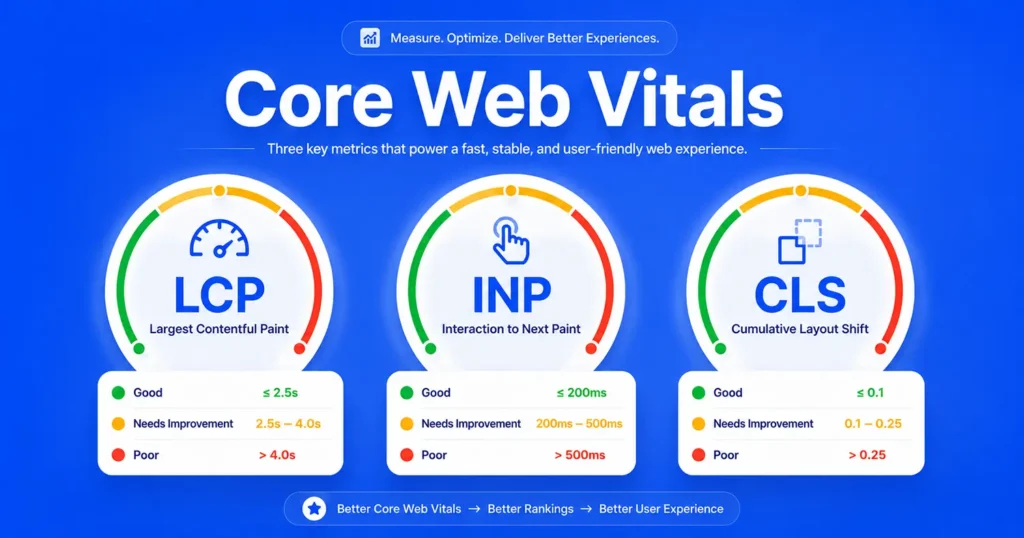
Check the Core Web Vitals report in Search Console, then read our Core Web Vitals guide for fixes to each metric.
Engagement rate
GA4 counts a session as engaged when it lasts longer than 10 seconds, includes a key event, or includes two or more page or screen views, according to Google’s Analytics Help. Engagement rate is the share of sessions that meet that bar. Bounce rate is the opposite number.
Compare your landing pages against each other. A page with far lower engagement than its siblings needs a better opening, a clearer answer, or a faster load.
Which SEO Metrics Can You Ignore?
You can safely ignore Domain Authority, total backlink counts, raw impressions, single-keyword rankings, bounce rate on its own, time on page, plugin SEO scores, and estimated traffic value. Each one can add context, but none tells you whether SEO is bringing in leads or revenue, so none deserves a spot in your monthly report.
Ignore is a strong word. Some of these numbers have a job. They just don’t earn a slot in the report you send to your boss or your client.
Domain Authority and similar scores
Moz created Domain Authority, scores it from 1 to 100, and states that Google doesn’t use it as a ranking factor. Other tools sell similar scores built from their own link data. Use these scores to compare sites when you shop for link opportunities. Never set one as a goal.
Total backlink count
One sitewide footer link or a pile of low-quality directory links can inflate the total in a day. Referring domains give you a cleaner read.
Raw impressions
Impressions rise when your pages appear for irrelevant searches, so a spike can mean nothing. Read them only next to clicks and CTR.
Single-keyword rankings and average position
Personalization, location, and search features change what each person sees, so the rank of one keyword is a rough guide at best. Average position also blends branded and non-branded queries into one number that hides more than it shows. Track groups of keywords by page or topic, then judge them by the clicks and conversions they bring.
Bounce rate on its own
In GA4, bounce rate is simply the inverse of engagement rate. Semrush notes that Google has never named bounce rate as a direct ranking factor, though it argues that user experience signals still count. A searcher who finds a fast answer and leaves hasn’t failed, a point seoClarity also makes. Read bounce rate next to engagement rate and conversions.
Time on page and exit rate
Page type decides what a good number looks like. A pricing page with a short visit may convert perfectly. A long guide with a short visit has a problem. Without that context, both numbers mislead.
Word count, content scores, and plugin SEO scores
These grade your checklist, not your results. A page can score 95 out of 100 and still earn zero clicks. Use the scores as a writing aid, never as proof of performance.
Estimated traffic value
Third-party tools model your traffic first and then price it, so the dollar figure stacks one estimate on top of another. Use it to compare competitors. Skip it when you need to prove ROI, because your own GA4 revenue or lead data does that job better.
How Do You Measure SEO in AI Search?
Measure AI search by tracking three things: referral visits from tools like ChatGPT, Perplexity, and Gemini, how often those tools cite your pages, and whether your brand appears in their answers. Referral traffic is the easiest to start with, because GA4 shows the source of every visit.
AI visits stay small for most sites today, but they can carry weight. Semrush’s July 2025 study found that the average AI search visitor was worth 4.4 times a traditional organic visitor, measured by conversion rate. The study covered more than 500 marketing and SEO topics, so treat the number as a direction, not a promise for your niche.
Three steps get you started without paid tools:
- Look for AI sources in GA4. Open Traffic acquisition and check for AI assistant traffic, a channel Semrush’s KPI guide points to. Your property may not group it. In that case, filter sessions by source for chatgpt.com, perplexity.ai, gemini.google.com, and claude.ai.
- Test your own citations. Each month, run ten buyer-style prompts in ChatGPT, Perplexity, and Gemini. Log which answers cite your pages and which name a competitor instead.
- Compare conversion rates. Put AI visits next to Organic Search in the same report and see which converts better.
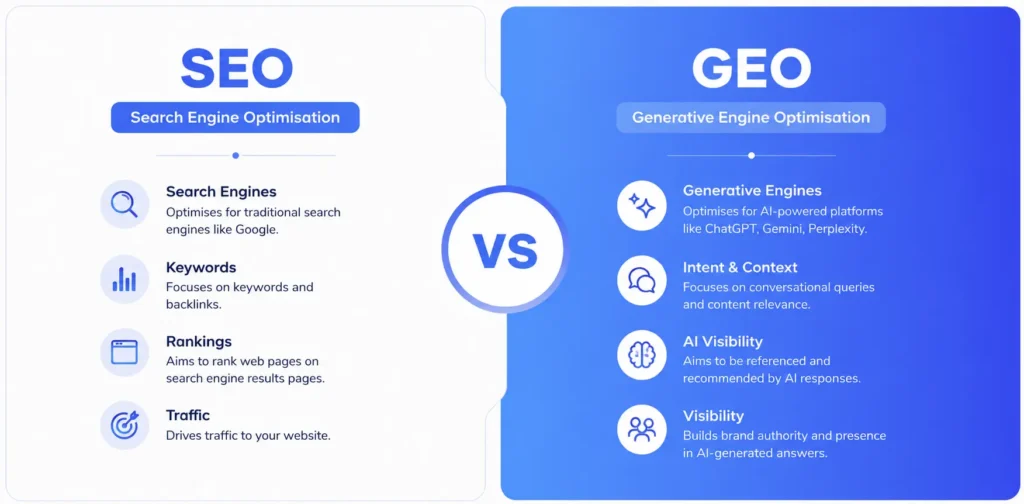
Paid tools such as Semrush’s AI Visibility and seoClarity’s ArcAI automate citation tracking at scale. You don’t need them on day one. Our GEO vs SEO comparison explains how the two disciplines overlap, and the beginner’s guide to GEO covers how to earn those citations.
Which SEO Metrics Should You Track for Your Goal?
One size fits no one. Pick the primary metric that matches your business goal, then add two early signals that tell you whether you’re on pace. This table gives you a starting point.
| Business goal | Primary (result) metric | Two early signals |
|---|---|---|
| Lead generation (B2B, services) | Organic leads or demo requests | Non-branded clicks, CTR on service pages |
| Ecommerce | Organic revenue | Conversion rate by landing page, CTR on category pages |
| Local business | Calls and direction requests from Google Business Profile | Organic conversions, non-branded clicks |
| Content or media site | Newsletter signups from organic search | Non-branded clicks, AI referral visits |
| Brand awareness | Non-branded clicks | Referring domains, AI citations |
Agency owners and in-house leads can use the same table to decide what goes into a client’s one-page report.
How to Build a 30-Minute Monthly SEO Report
A good monthly SEO report fits on one page. It shows four core metrics, compares each one with the same period last year, and ends with three plain sentences: what changed, why it probably changed, and what you will do next. Add diagnostics only when a core number drops.
Follow this routine every month:
- Set the date range. Compare the last 28 days with the same 28 days last year. seoClarity recommends year-over-year views because they separate real growth from seasonal swings.
- Pull Search Console data. Note total clicks, non-branded clicks, and CTR for your top ten pages.
- Pull GA4 data. Record organic key events and key event rate from the Traffic acquisition report.
- Scan indexing. Open the Pages report and look for new errors.
- Log referring domains. Do this once a quarter.
- Write three sentences. State what changed, why you think it changed, and what you will do next month.
Here is an example, with invented numbers for illustration. Say non-branded clicks rose 15 percent while conversions stayed flat. Your three sentences might read: “Non-branded clicks grew because two new guides started ranking. Conversions stayed flat because both guides attract early-stage readers. Next month we add a clear call to action and an internal link to the service page.” That is a report a busy person can read in under a minute and act on.
Three Mistakes That Make SEO Reports Useless
Too many metrics. A 40-metric report feels thorough. It really hides the signal. Cut any number that never changes a decision.
Month-to-month comparisons only. Seasonality fools almost everyone. A December dip for a B2B site can look like a penalty. Compare with the same month last year before you panic or celebrate.
Tool estimates taken as facts. Third-party tools estimate organic traffic, keyword volume, and traffic value. Search Console and GA4 hold your real numbers. Use the estimates to compare against competitors and use your own data to make decisions. Expect the two sources to differ, too. Search Console counts Google clicks only, while GA4 organic sessions include Bing and other search engines. Watch the trend, not the gap.
Frequently Asked Questions
What are the most important SEO metrics to track?
Start with organic conversions, non-branded organic clicks, click-through rate on your key pages, and referring domains. Together they show whether search brings in the right people, new people, and links that build authority. Add indexing health, Core Web Vitals, and engagement rate as diagnostics when results drop.
How many SEO metrics should I track?
Keep your monthly report to four core metrics, and open diagnostics only when something breaks. Semrush’s guide argues that a few hand-picked KPIs give a clearer read than a dozen. More numbers rarely mean better decisions. They usually mean slower ones.
Is Domain Authority a Google ranking factor?
No. Moz created Domain Authority and states that Google doesn’t use it. Treat it as a rough comparison score when you prospect for links. It can’t replace organic conversions, non-branded clicks, or referring domains as measures of SEO performance.
Is bounce rate a ranking factor?
Google hasn’t named bounce rate as a direct ranking factor, and GA4 now defines it as the share of sessions that weren’t engaged. Treat it as a diagnostic. Compare it across your own landing pages and read it next to conversions before you change anything.
What SEO metrics should I report to a client?
Lead with organic conversions or leads, then add non-branded clicks, CTR on key pages, and a line on AI search visits. Close with a short note on what changed and what happens next. Clients read outcomes, not dashboards.
Your Next Step
Open Search Console, filter out your brand name, and read your non-branded clicks. That one view shows how many new people SEO brings you each month. Add organic conversions from GA4 and you have the start of a report that ties SEO to money.
Not sure where to find these reports? Start with our Search Console guide, then set up key events with the GA4 conversion tracking guide.